Cursor AI Reviews: Is This AI Code Editor Worth Your Time?
Published: 28 Apr 2026
Most developers don’t realize they are coding the hard way until they see Cursor AI in action. What looks like a normal code editor at first is actually an AI-powered system that can write, fix, and explain code while you work.
But here’s the real question. Can an AI coding assistant like Cursor AI actually replace traditional coding workflows, or is it just another overhyped tool?
In this Cursor AI review, we break down real performance, hidden limitations, pricing, and whether it truly deserves a place in your developer toolkit in 2026.
What is Cursor AI?
Cursor AI is an intelligent code editor designed to make programming faster and more intuitive. It looks and feels similar to traditional editors like Visual Studio Code, but with one major difference. It understands your code and actively helps you write and improve it.
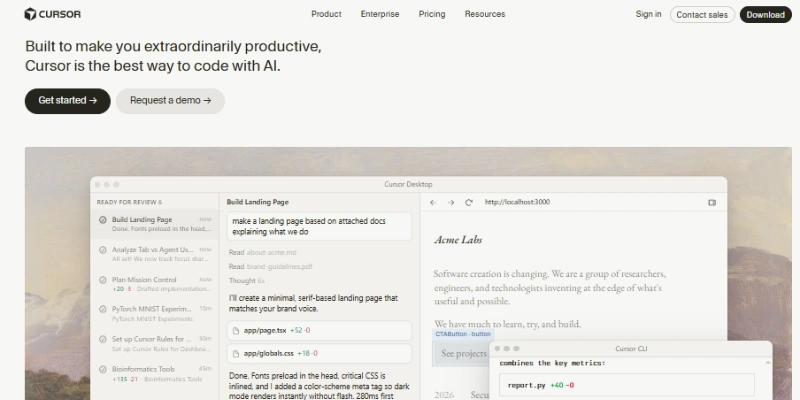
Instead of treating coding as a manual process, Cursor AI works like a smart assistant inside your editor. You can ask it questions, generate code, fix errors, or even rewrite entire sections without leaving your workspace.
At its core, it combines coding with conversational AI, similar in spirit to tools like ChatGPT, but built directly into a developer environment.
How Cursor AI Works
The idea behind Cursor AI is simple. You write prompts in plain English, and it turns them into working code.
Let’s say you want to create a login form. Instead of writing everything from scratch, you can type something like
“Create a responsive login form using React with validation.”
Within seconds, Cursor AI generates a structured code block that you can refine or edit.
It does not just respond to commands. It understands the full context of your project. That means if you ask it to update a function or fix a bug, it looks at the surrounding code before suggesting changes.
This context awareness is what makes it feel less like a tool and more like a collaborator.
Key Features of Cursor AI
Before we get into the details, it’s important to understand what makes Cursor AI unique in real-world applications. These features are more than just technical add-ons; they influence how easily and efficiently you can create, edit, and manage code.
1. AI Code Generation
One of the strongest aspects of an AI coding tool is how quickly it can generate code. From small functions to full components, it handles a wide range of tasks.
This is especially useful when:
- Starting a new project
- Building repetitive structures
- Testing ideas quickly
Instead of spending hours on setup, you can focus on refining your logic.
2. Smart Autocomplete
Autocomplete is nothing new, but Cursor AI takes it further. It does not just complete words or lines. It predicts entire blocks of code based on your intent.
As you type, it suggests meaningful code that actually fits your project. This reduces the need to constantly think about syntax and structure.
3. Code Explanation
Reading someone else’s code can be confusing. It helps by explaining what a piece of code does in simple language.
This is especially helpful for beginners or when working with unfamiliar codebases. You do not need to search for explanations online. Everything is available inside your editor.
4. Debugging Support
Bugs are part of coding, but finding them can be frustrating. Cursor AI helps identify issues and suggests possible fixes.
It does not always get everything perfect, but it gives you a strong starting point. This can save a lot of time, especially when dealing with complex errors.
5. Chat With Your Code
This is where Cursor AI feels truly different. You can ask questions like:
- Why is this function slow
- Can you optimize this loop
- Convert this code into Python
It responds with clear answers and updated code suggestions. This creates a smooth workflow where learning and coding happen together.
6. Context Awareness
Many tools only focus on a single file or line. Cursor AI looks at your entire project.
This allows it to:
- Suggest more accurate improvements
- Maintain consistency across files
- Understand dependencies and structure
It feels like working with someone who actually understands your project.
Cursor AI Pricing Plan
If you are thinking about using Cursor AI, understanding its pricing is important because the cost is not just about a monthly fee. It also depends on how much you actually use the AI features.
Here is a clear and real breakdown of Cursor AI pricing in 2026:
| Plan | Price | Best For |
|---|---|---|
| Free | $0 | Beginners |
| Pro | $20/month | Regular developers |
| Pro+ | $60/month | Heavy users |
| Ultra | $200/month | Power users |
| Teams | $40/user/month | Teams |
| Enterprise | Custom | Large companies |
Important Thing Most People Miss
Cursor AI uses a credit-based system, not just a flat subscription.
- Each plan includes a certain amount of usage credits
- These credits are consumed depending on which AI model you use
- Heavy usage or advanced models can increase your cost
This means two users on the same plan can pay differently based on how they use the tool.
Final Thought on Pricing
Cursor AI pricing is flexible, but it requires awareness. If you use it smartly, even the Pro plan is enough for most developers. But if you rely heavily on advanced AI models, your usage can scale quickly.
That is why it is best to start with the free version, understand your needs, and then upgrade based on how often you actually use the AI features.
Cursor AI Pros and Cons
It’s important to get a clear view of both sides before deciding if Cursor AI is right for your workflow. Of course, like any AI-powered coding tool, it has significant benefits but also has some limitations users should be aware of.
| Pros |
|---|
|
| Cons |
|---|
|
Real Cursor AI Reviews From Users
When you explore real feedback from developers and beginners, a clear pattern shows up. Most people describe Cursor AI as a time-saving tool that changes how they approach coding, especially during early project development and debugging.
What Users Like
A large number of users highlight how quickly they can turn ideas into working code. Tasks that used to take hours are often completed in just a few minutes, which makes the workflow feel much smoother and more productive.
Another thing users often appreciate is the built-in explanations. Instead of searching through forums or documentation, they can simply ask inside the editor and get clear, easy-to-understand answers. This is especially helpful for beginners who are still learning core programming concepts.
Common Complaints
On the other side, some users mention that Cursor AI does not always fully understand complex or layered instructions. In certain cases, it may generate code that needs correction or refinement.
There is also a concern among some developers that depending too heavily on AI assistance can slow down skill development over time. Because of this, many suggest using it as a support tool rather than a complete replacement for learning and practice.
Cursor AI vs Competitors
An AI code editor compares with other popular tools to help you see where it actually fits in a developer’s workflow. Each option has its own strengths, but the experience can feel quite different depending on what you choose.
Cursor AI vs GitHub Copilot
GitHub Copilot is mainly designed to assist with code suggestions and fast autocomplete while you type. It is helpful for quick coding support and improving speed in routine tasks.
Cursor AI, on the other hand, offers a more interactive experience. Instead of only suggesting code, it allows deeper communication with your project, helping you edit, understand, and improve code in context.
In simple terms, Copilot feels like a quiet assistant in the background, while Cursor AI feels more like a coding partner you can actively talk to.
Cursor AI vs ChatGPT for Coding
ChatGPT is widely used for coding help, explanations, and generating snippets. However, it works outside your development environment, which means you often have to copy code back and forth.
Cursor AI brings that same AI capability directly into your editor. You can write, ask questions, and modify code in one place without switching tabs, which makes the workflow smoother and more connected.
Cursor AI vs Traditional Code Editors
Traditional code editors primarily focus on manual coding, with only basic suggestions and syntax support. They give you control but require more time and effort to build and debug everything yourself.
Cursor AI introduces a more intelligent layer on top of the editor. It understands your code, assists with writing, and helps you fix issues faster, making the overall development process more efficient and less repetitive.
Best Use Cases of Cursor AI
Before looking at specific scenarios, it helps to understand where the AI coding assistant actually makes the biggest difference. In real projects, it is not just about writing code faster but about removing friction from everyday development tasks so you can focus more on building and less on struggling with repetitive work.
- Rapid Prototyping: If you want to test an idea quickly, it helps you build a working version in minutes.
- Debugging Code: Instead of spending hours searching for errors, you can get instant suggestions and fixes.
- Learning Programming: It acts like a tutor, explaining concepts and guiding you through problems.
- Automating Repetitive Tasks: From creating templates to writing boilerplate code, it saves time on routine work.
Final Verdict: Is Cursor AI Worth It?
Cursor AI is not just another coding tool. It represents a shift in how developers interact with technology.
It saves time, simplifies complex tasks, and makes coding more accessible. At the same time, it still requires human oversight and understanding.
If you are looking to improve productivity and learn faster, it is definitely worth trying. If you expect it to replace your skills entirely, it will fall short.
The real value of Cursor AI lies in how you use it. Treat it as a partner, and it can significantly change the way you build and create.
FAQs About Cursor AI Reviews
Cursor AI is not exactly a replacement for VS Code but an upgraded AI-powered version of it. It adds intelligent code generation, explanations, and debugging inside the editor, which VS Code does not offer by default. If you want AI assistance while coding, Cursor AI feels more advanced and faster.
Yes, Cursor AI can generate full application structures like landing pages, APIs, and basic web apps. However, complex projects still require human guidance to refine logic, architecture, and scalability. It works best as an AI coding assistant rather than a fully independent developer.
Cursor AI is highly accurate for common programming tasks and standard frameworks. However, in complex or multi-layered projects, it may sometimes produce code that needs adjustments. Developers should always review and test generated code before using it in production.
Yes, Cursor AI is very helpful for beginners because it explains code in simple language and guides step-by-step coding. It reduces confusion and helps new developers understand programming concepts faster while practicing in real time.
Cursor AI significantly improves productivity by reducing manual coding, debugging time, and repetitive tasks. Developers can focus more on logic and problem-solving instead of writing boilerplate code.
No, Cursor AI cannot replace developers. It supports coding tasks but still requires human decision-making, creativity, and system design skills. It works as a productivity tool, not a replacement for developers.
Yes, Cursor AI is generally safe for professional use, but code should always be reviewed before deployment. It is designed to assist developers, not to fully automate critical production systems.






- Be Respectful
- Stay Relevant
- Stay Positive
- True Feedback
- Encourage Discussion
- Avoid Spamming
- No Fake News
- Don't Copy-Paste
- No Personal Attacks
- Be Respectful
- Stay Relevant
- Stay Positive
- True Feedback
- Encourage Discussion
- Avoid Spamming
- No Fake News
- Don't Copy-Paste
- No Personal Attacks
