Fireflies.ai vs Otter.ai: Which AI Meeting Tool Is Better?
Published: 6 Jan 2026
Are you confused about Otter.ai and Fireflies? I understand how difficult it can be to make a choice. I’ve used both, and although they are both intended to facilitate meetings and transcription, each has unique features and benefits.
In this article, I’m sharing my hands-on experience, breaking down what each tool does best, and helping you determine which one will actually fit your workflow.
Now, let’s examine Fireflies.ai vs Otter.ai step by step.
What is Fireflies.ai?
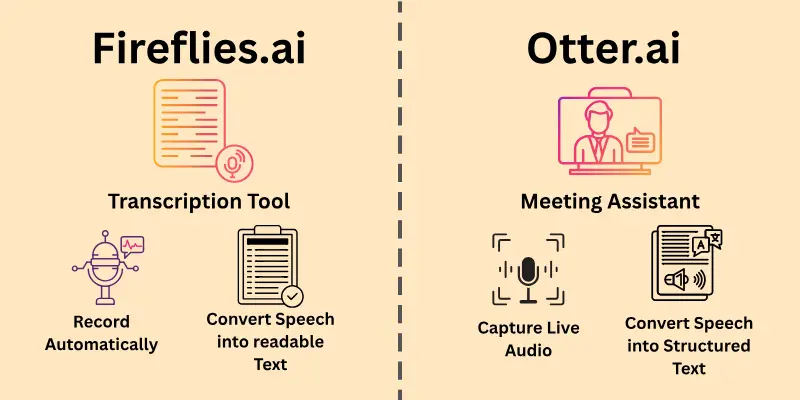
Fireflies works as a meeting assistant that captures spoken conversations. It helps people keep clear records without writing notes during calls.
Here’s a closer look at what it offers.
- Records virtual discussions automatically.
- Converts speech into readable text.
- Creates summaries after sessions.
- Connects with work tools and calendars.
- Supports team review and follow-ups.
This platform is ideal for professionals who attend frequent online meetings.
What is Otter.ai?
Otter.ai functions as a real-time transcription tool for conversations. It helps users create accurate meeting records without typing notes.
Let’s explore the key features and capabilities of Otter.ai.
- Captures live audio during meetings
- Converts speech into structured text
- Generates searchable Otter.ai meeting notes
- Allows shared editing and comments
- Supports follow-ups with saved transcripts
This platform works well for individuals and teams handling regular discussions.
Key Differences: Fireflies.ai vs Otter.ai
Fireflies and Otter.ai differ mainly in how they fit into regular workflows and collaboration styles. These differences frequently influence which platform various users find more useful.
Here are the key differences between them.
- Ease of Use
- Accuracy and Language Coverage
- Speaker Recognition Tools
- Summary and Insight Generation
- Content Organization
- Integrations and Automations
- Pricing
Let’s look at them in detail.
1. Ease of Use
Both tools help with meeting notes, but they feel very different when you open them for the first time.
- Fireflies.ai: Once connected to your calendar, it quietly joins meetings and handles everything in the background. The first day could feel a little hectic because there are more settings and options. After a few meetings, everything begins to make sense and feel structured. Ideal for users who don’t mind taking some time to learn.
- Otter.ai: Otter feels simple right away. You open it, start recording, and see text appear instantly. There is almost nothing to configure. You do not need tutorials to get started. It suits people who want something fast without extra steps. Perfect for beginners or casual users.
2. Accuracy and Language Coverage
When actual work is decided upon in meetings, clear transcripts are important.
- Fireflies.ai: Handles long discussions well and stays consistent even when people talk over each other. It supports many languages, which helps teams spread across regions. Even during complicated conversations, the results remain readable. An excellent option for teams that are diverse or worldwide.
- Otter.ai: Works best in English and performs very well in quiet, structured meetings. Interviews and one-on-one conversations are clear and easy to read. It shines when conversations stay focused. Ideal for groups that speak English as their primary language.
3. Speaker Recognition Tools
During reviews, they save time to know who said what and prevent confusion later.
- Fireflies.ai: Detects multiple voices and assigns labels automatically. Users can edit names later for clarity. This is useful for reviewing group conversations. Beneficial for monitoring departmental decisions. Excellent for formal meetings.
- Otter.ai: Highlights speakers clearly in real time. Manual corrections are quick and easy. The display makes conversations easy to follow. Helpful during live collaboration. Suitable for discussions with fewer participants.
4. Summary and Insight Generation
Each platform has a different approach to handling meeting highlights.
- Fireflies.ai: Creates structured summaries with action items and key points. Teams can concentrate on results rather than complete transcripts with the aid of insights. It works well for reporting and follow-ups. Saves time at the end of extended sessions. Good for business reviews.
- Otter.ai: Produces short recaps focused on conversation flow. Highlights important moments during the session. After meetings, it’s easy to scan. Better for quick understanding. Suitable for everyday or informal conversations.
5. Content Organization
They should be able to locate historical data in different ways.
- Fireflies.ai: Offers advanced filtering across meetings and topics. Conversations stay organized inside workspaces. Previous conversations can still be easily retrieved. Helpful for long-term knowledge storage. Designed for teams managing large volumes.
- Otter.ai: Uses simple search across saved records. Notes are presented in an easy-to-follow timeline. The organization feels lightweight and accessible. Easy for individual users. Perfect for personal archives.
6. Integrations and Automations
Their workflow connection plays a big role in daily use.
- Fireflies.ai: Connects with CRMs, task tools, and collaboration platforms. Automates note sharing and follow-ups. Fits well into business processes. Reduces manual work after calls. Strong option for teams that use several tools.
- Otter.ai: Supports basic calendar and meeting app syncing. Sharing works smoothly within its own environment. Keeps things straightforward. Requires fewer steps for setup. Better for simpler workflows.
7. Pricing
Cost plays a big role in choosing the right meeting notes tool, especially for individuals and teams on a budget.
Fireflies.ai: Fireflies offers a free tier with basic features, generous minutes, and paid plans that scale up for regular users and teams.
- Free: $0/month, includes up to ~800 minutes of stored transcription and basic summaries.
- Pro: $18 per user/month or $10 when billed annually, unlimited transcription credits, ~8,000 minutes of storage, advanced summaries, and integrations.
- Business: $29 per user/month or $19 when billed annually, adds team analytics, video recording, unlimited storage, and deeper workflow features.
- Enterprise: $39 per user/month, includes advanced security, dedicated support, and compliance options.
Otter.ai: Otter.ai also provides a free version and tiered paid plans for individuals and organizations.
- Free: $0/month, includes 300 minutes of transcription per month with a ~30-minute limit per meeting.
- Pro: $16.99 per user/month or $8.33 when billed annually, including 1,200 minutes of meetings, longer recording limits, and export options.
- Business: $30 per user/month or $19.99 when billed annually, offering up to 6,000 minutes/month, admin controls, team features, and more.
- Enterprise: Custom pricing, adds advanced security, SSO, and organization-wide deployment.
Note: Pricing may vary by region or future updates, so please check the official websites for the latest pricing plan.
Comparison Table: Fireflies.ai vs Otter.ai
Here is the quick comparison between both Fireflies and Otter.ai:
| Features | Fireflies.ai | Otter.ai |
| Ease of use | Medium | Easy |
| Transcription Type | Automated | Real-Time |
| Language Support | Multiple | Limited |
| Speaker Detection | Advanced | Basic |
| Meeting Summaries | Detailed | Simple |
| Integrations | Many | Few |
| Team Collaboration | Strong | Moderate |
| Search Capability | Advanced | Basic |
| Speed | Moderate | Fast |
| Pricing | Medium | Low |
| Free Option | Yes | Yes |
| Best For | Team | Individuals |
Which One Is Best for You?
I’ve used both tools in real meetings, from quick one-on-one calls to long team discussions, and the difference becomes clear once you rely on them daily. The choice between Fireflies and Otter.ai really depends on how you work and how much structure you need after a meeting ends.
If you are a beginner or a casual user, Otter.ai feels easier. If you work in a professional or team setting, Fireflies.ai offers more value.
Both tools do their job well. The right choice depends on how often you meet, who you work with, and how detailed your notes need to be. Pick the one that matches your daily routine, and you will get the best results.
Conclusion
In this guide, we looked at the differences between Fireflies.ai and Otter.ai in great detail. I explained how they handle meetings in their own ways, how simple they feel to use, what options they provide, how pricing works, and which users they suit best.
Both platforms help capture conversations, but the better choice depends on how you work and what you expect after a meeting ends. From my experience, choose the one that feels natural to you and supports the way you manage your meetings.
Make sure you don’t skip the next FAQs section. You may discover something new and interesting that you wouldn’t want to miss.
FAQs
Curious about the differences between Fireflies.ai and Otter.ai? Below are some common questions people ask.
Fireflies.ai is an AI meeting transcription tool that records and converts conversations into searchable text. It works with popular platforms like Zoom, Google Meet, and Microsoft Teams. It helps users save time by automatically capturing important discussions.
Otter.ai offers several plans for individuals, professionals, and businesses. Pricing depends on transcription limits and advanced collaboration features. Otter.ai pricing is often compared with Fireflies.ai when choosing an AI note-taking tool.
Fireflies.ai automatically generates structured summaries after every meeting. These summaries highlight action items, key topics, and decisions. Fireflies.ai meeting notes make it easy to review conversations without listening to full recordings.
Fireflies.ai offers multiple subscription tiers designed for individuals and teams. The plans vary based on features like storage, integrations, and collaboration tools. Fireflies.ai pricing is competitive compared to other AI meeting assistant software.
Otter.ai is known for real-time transcription accuracy and a simple interface. However, some users find its advanced features limited to lower plans. Reviewing Otter.ai’s pros and cons can help decide if it fits your workflow.
Both tools support team collaboration, shared notes, and meeting history. Fireflies.ai is often preferred for automation, while Otter.ai excels in live transcription. The best choice depends on how your team runs meetings.
Otter.ai includes an AI assistant that joins meetings and captures conversations in real time. It helps users quickly find highlights and shared notes. It is popular among students, journalists, and remote teams.
AI transcription accuracy varies depending on audio quality and speaker clarity. Both Fireflies.ai and Otter.ai continuously improve their models to support multiple accents and languages. Using a good microphone can significantly improve transcription results.
Both platforms use encryption and follow standard data protection practices. They allow users to control access to recordings and transcripts. This makes them suitable for business meetings and remote work environments.
Start by identifying whether you need automation, live transcription, or advanced integrations. Compare features like accuracy, pricing, and collaboration tools. Reading a detailed Fireflies.ai vs Otter.ai comparison can help you make the right decision.



- Be Respectful
- Stay Relevant
- Stay Positive
- True Feedback
- Encourage Discussion
- Avoid Spamming
- No Fake News
- Don't Copy-Paste
- No Personal Attacks
- Be Respectful
- Stay Relevant
- Stay Positive
- True Feedback
- Encourage Discussion
- Avoid Spamming
- No Fake News
- Don't Copy-Paste
- No Personal Attacks
