Grammarly vs QuillBot: Which Writing Tool Is Better in 2026?
Published: 13 Apr 2026
Writing online content, assignments, emails, and blogs has become much easier with the help of AI writing tools. These tools are designed to improve grammar, fix mistakes, and help users write more clearly and confidently.
People often compare Grammarly vs QuillBot because they both improve writing, but in very different ways. One focuses on correcting and refining your text, while the other focuses on rewriting and transforming it. This makes it confusing for users to decide which tool is actually better for their needs.
In this article, we will explore their features, performance, pricing, and everyday use cases in a simple way so you can clearly understand the difference.
Let’s break down their differences to find the best tool for your writing needs.
What Is Grammarly?
Grammarly is a popular writing tool designed to help users improve grammar, spelling, punctuation, and overall clarity. It works as a real-time assistant that checks your writing while you type.
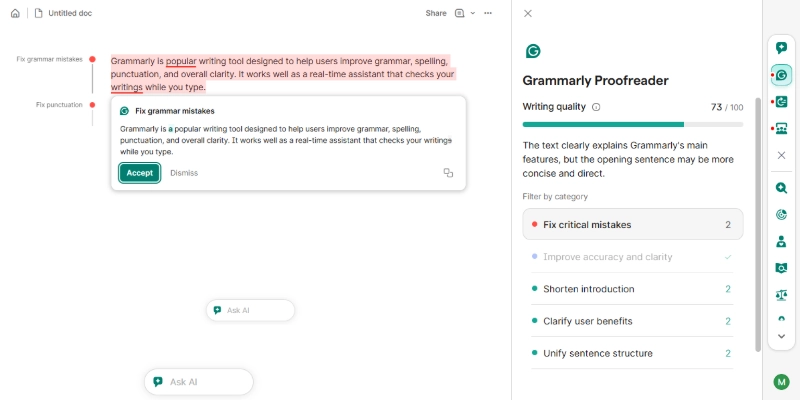
It is widely used by students, professionals, bloggers, and businesses who want polished and error-free content. As a grammar checker tool, Grammarly also suggests better word choices and improves sentence tone.
Key Features of Grammarly:
- Grammar and spelling correction in real time
- Tone detection and writing style suggestions
- Clarity and engagement improvements
- Plagiarism detection in the premium version
- AI writing support for generating and improving text
Grammarly is more than just correction software. It acts like a writing improvement tool that helps users become better writers over time.
You can visit the official Grammarly website to learn more about its grammar checking and writing improvement features.
What Is QuillBot?
QuillBot is an AI-based writing platform that mainly focuses on rewriting and paraphrasing text. It is very popular among students and content creators who want to rephrase content without changing its meaning.
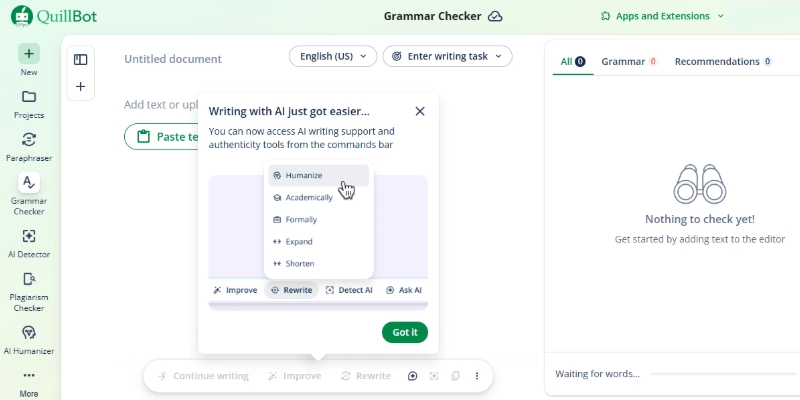
Unlike Grammarly, QuillBot is designed as a paraphrasing tool first, but it also includes grammar checking and summarizing features.
Key Features of QuillBot:
- Advanced paraphrasing modes like formal, simple, and creative
- Grammar-checking feature
- Text summarizer for long content
- Citation generator for academic writing
- Translation support in multiple languages
QuillBot works well as a content writing assistant, especially when you need fresh versions of existing text.
You can visit the official QuillBot website to explore its paraphrasing, summarizing, and writing tools.
Grammarly vs QuillBot: Feature Comparison
Both tools offer helpful features, but they are built for different purposes. Let’s compare them side by side to understand which one performs better in each area.
1. Writing Style Support
When comparing how each tool handles writing style, the difference is quite clear.
Grammarly
- Focuses on improving sentence clarity and flow
- Suggests better word choices and tone adjustments
- Helps make writing more professional and polished
QuillBot
- Rewrites sentences in different styles
- Offers multiple modes like formal, simple, and creative
- Focuses more on changing structure than refining tone
Verdict: If you want to improve and polish your writing, Grammarly is a better choice, but for rewriting in different styles, QuillBot works better.
2. Grammar Checking
When looking at grammar accuracy, both tools perform differently.
Grammarly
- Detects grammar, punctuation, and spelling errors in detail
- Provides context-based corrections
- Offers advanced suggestions for better readability
QuillBot
- Checks basic grammar and spelling mistakes
- Provides simple corrections
- Not as detailed in explanations
Verdict: If strong grammar accuracy matters to you, Grammarly is the better option, but for basic corrections, QuillBot is enough.
3. Paraphrasing Ability
When it comes to rewriting content, this area is where the most significant difference appears.
Grammarly
- Offers limited sentence rewriting suggestions
- Focuses more on improving existing text
- Not designed for full content rewriting
QuillBot
- Provides advanced paraphrasing modes
- Can completely rewrite sentences while keeping the meaning
- Useful for creating multiple content versions
Verdict: If your goal is rewriting or paraphrasing, QuillBot clearly performs better, while Grammarly is better for refining original content.
4. Extra Tools
When comparing additional features, both tools offer useful but different options.
Grammarly
- Includes a plagiarism checker in the premium plan
- Offers tone detection and writing insights
- Works across browsers and writing platforms
QuillBot
- Includes a summarizer for long text
- Provides a citation generator for academic use
- Offers translation features
Verdict: If you need editing and originality checks, Grammarly is more useful, but for summarizing and academic support, QuillBot is a better fit.
Accuracy and Performance
Grammarly performs strongly in grammar correction and sentence improvement. It understands context well and provides accurate suggestions, making it reliable for professional writing.
QuillBot performs best when rewriting sentences or generating alternate versions of text. However, its grammar suggestions are not as deep as Grammarly’s.
Overall, Grammarly is better for accuracy, while QuillBot is better for rewriting flexibility.
Ease of Use
Both tools are simple to use, even for beginners.
Grammarly has a clean interface and integrates smoothly with browsers, Google Docs, and Microsoft Word. It works quietly in the background and highlights mistakes instantly.
QuillBot also has a simple dashboard. Users can paste text, choose a mode, and get rewritten content in seconds. It is more task-focused compared to Grammarly.
As online writing tools, both platforms are beginner-friendly and do not require technical knowledge.
Comparison Table: Grammarly vs QuillBot
Here’s a quick side-by-side comparison to help you choose faster:
| Feature | Grammarly | QuillBot |
|---|---|---|
| Primary Purpose | Grammar correction & writing improvement | Paraphrasing & rewriting content |
| Grammar Checking | Advanced, real-time corrections | Basic grammar checking |
| Paraphrasing Ability | Limited rewriting support | Strong paraphrasing with multiple modes |
| Writing Style Improvement | Excellent tone, clarity, & fluency suggestions | Moderate rewriting focus |
| Summarization Tool | Not available (limited AI features) | Available (text summarizer) |
| Plagiarism Checker | Available in the premium plan | Available in the premium plan |
| Language Support | Mainly English | Multiple languages supported |
| Ease of Use | Very easy & beginner-friendly | Easy but requires manual refinement |
| Best For | Professional writing, emails, blogs | Students, rewriting & content variation |
| Accuracy Level | Very high for grammar & tone | Good for paraphrasing, weaker grammar depth |
| Integrations | Works with Chrome, Word, Docs, etc. | Browser extension + web tool |
| Pricing | Higher cost, premium-focused | More affordable, budget-friendly |
Pros and Cons: Grammarly vs QuillBot
Both tools have their strengths and limitations depending on how you use them. Here is a simple breakdown to help you quickly understand what works well and what might not.
Grammarly Pros:
- Easy to use from the first day
- Clean interface with no confusion
- Gives quick feedback while writing
- Builds better writing habits over time
Grammarly Cons
- The premium plan feels costly for casual users
- The free version feels limited for advanced needs
- Sometimes suggests changes you may not need
QuillBot Pros
- Saves time when rewriting large content
- Flexible modes give more control
- Budget-friendly for students
- Simple layout with quick results
QuillBot Cons
- Requires manual checking after rewriting
- Output may need small edits for clarity
- Limited support for long-form editing
Pricing Comparison: Grammarly vs. QuillBot
Pricing plays a big role when choosing between these tools, especially if you plan to use them regularly. Here is a clear and updated breakdown of what you actually pay.
Grammarly Pricing
When looking at Grammarly’s pricing, it focuses more on advanced writing support at a higher cost.
- Free Plan: $0 (basic grammar, spelling, and limited suggestions)
- Premium (Pro): Around $12/month (billed annually)
- Business Plan: Custom prices for teams
The premium version includes full grammar checks, tone suggestions, sentence rewrites, and plagiarism detection.
QuillBot Pricing
When comparing QuillBot pricing, it is more budget-friendly and flexible.
- Free Plan: $0 (limited paraphrasing and basic features)
- Premium:
- $19.95/month (monthly)
- Around $8.33/month (annual plan)
- Student Plan: Around $6.25/month (annual discount)
The premium version gives unlimited paraphrasing, all writing modes, faster processing, and extra tools like a plagiarism checker.
Verdict: If you want a powerful writing assistant with deep correction features, Grammarly justifies its higher price. But if you are looking for an affordable tool mainly for rewriting and paraphrasing, QuillBot offers better value for money.
Which One Should You Choose?
Grammarly and QuillBot are two popular AI writing tools designed for different purposes. Grammarly focuses on improving grammar, clarity, and overall writing quality, making it ideal for professional and error-free content.
QuillBot, on the other hand, specializes in paraphrasing and rewriting text, which is useful for creating multiple content versions. If you need accurate editing and polished writing, Grammarly is the better choice, while QuillBot is more suitable for rewriting and content variation.
Conclusion
In this guide, we looked at Grammarly vs QuillBot differences in detail. We covered how each tool works, its features, pricing, performance, and where it fits best in daily use.
Both tools are useful in their own way, but the right choice depends on your main goal. If your focus is on improving grammar, clarity, and overall writing quality, Grammarly is the better option. If you need to rewrite content, create variations, or paraphrase text quickly, QuillBot will suit you better.
Before you decide, don’t miss the FAQs section below. It answers common questions that can help you choose the right tool with more confidence.
FAQs
Here are a few frequently asked questions related to Grammarly vs QuillBot.
Grammarly is a reliable grammar-correcting software that catches even minor mistakes and improves sentence clarity. QuillBot can fix basic errors, but it does not go as deep as Grammarly. If accuracy matters, Grammarly is the stronger option.
QuillBot is a useful online paraphrasing tool, especially for quickly rewriting content. However, it does not fully replace Grammarly because it lacks advanced editing and tone improvement. For best results, many users combine both tools.
QuillBot supports academic paraphrasing tools’ needs by helping students rewrite and simplify complex text. Grammarly, on the other hand, improves grammar and overall structure.
- Use QuillBot for rewriting.
- Use Grammarly for final editing
Yes, Grammarly acts as an effective email writing assistant that improves tone and clarity. It helps make your message sound more polite and professional. This is especially useful for workplace communication.
QuillBot works well as a content rewriting tool that creates fresh versions of blog content. It helps avoid repetition and gives new sentence variations. However, you may still need to review the final output for better flow.
QuillBot is often considered a budget writing tool because it offers useful features at a lower price. Grammarly costs more but provides deeper writing support. Your choice depends on whether you need rewriting or full editing.
Yes, Grammarly includes a built-in plagiarism checker tool in its premium plan. It scans your content and compares it with online sources.
- Helps ensure originality
- Useful for academic and professional writing
QuillBot can support SEO content rewriting by generating different versions of your text. This helps avoid duplicate content issues. Still, manual editing is important to keep the content natural and keyword-friendly.
Grammarly works as a helpful writing improvement tool by showing suggestions and corrections in real time. Over time, users start understanding common mistakes. This makes writing clearer and more confident.
Using both tools can create a smooth AI writing workflow for better results. QuillBot helps with rewriting, while Grammarly refines and corrects the final draft.
- QuillBot for content variation
- Grammarly for polishing and accuracy





- Be Respectful
- Stay Relevant
- Stay Positive
- True Feedback
- Encourage Discussion
- Avoid Spamming
- No Fake News
- Don't Copy-Paste
- No Personal Attacks
- Be Respectful
- Stay Relevant
- Stay Positive
- True Feedback
- Encourage Discussion
- Avoid Spamming
- No Fake News
- Don't Copy-Paste
- No Personal Attacks
