Pros and Cons of Grammarly: Best Features for Writing
Published: 3 Jan 2026
Grammarly is a tool that helps you check your writing and fix mistakes anytime you write. Many people use it because it can save time and make writing easier. But just like anything else, it has both good and bad sides.
I’ve seen many people confused about whether it really helps or not, so let’s break it down. It’s important to understand the pros and cons of Grammarly so you can decide if it’s right for you. In this article, you will learn the benefits, the possible drawbacks, and how to use Grammarly in the smartest way.
Pros of Grammarly
This tool offers many benefits, making writing easier and more accurate. Let’s explore how Grammarly can help writers in different ways.
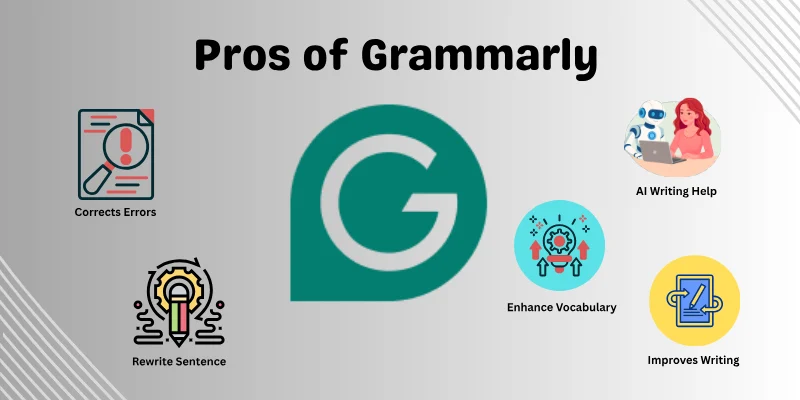
Here are some benefits of Grammarly.
- Corrects Errors
- Improves Writing
- Enhances Vocabulary
- Rewrite Sentences
- AI Writing Help
Let’s cover them in detail.
1. Corrects Errors
Grammarly checks your writing for mistakes in grammar, spelling, and punctuation. It catches errors. This helps your writing look clear and neat. It also saves time because you don’t have to spend so long revising.
Both students and professionals can feel more confident in their work. You can concentrate on your writing while it fixes the mistakes.
- Helps catch grammar and spelling mistakes quickly.
- Spot punctuation errors.
- Make your writing clear and professional.
2. Improves Writing
This feature helps your writing be clear and easy to understand. Long or confusing sentences are made simpler and smoother. It suggests better words so your ideas are expressed in the right way.
With clearer writing, readers can easily follow what you are saying. Your message becomes stronger, and your points are easier to remember.
- Change hard words to easier ones.
- Breaks long sentences into simpler parts.
- Show your points in an easy way.
3. Enhances Vocabulary
Grammarly suggests new words to make your writing more interesting and professional. It helps you avoid repeating the same words and encourages using terms that better match your meaning.
Using good vocabulary gives your writing a polished feel. It makes even simple content more engaging, and your ideas sound more confident and well-thought-out.
- Suggests better words for variety.
- Helps avoid repeating the same words.
- Makes your writing sound professional.
4. Rewrite Sentences
It gives guidance on how to express thoughts more effectively. It points out sentences that might sound awkward or lengthy, offering alternatives that feel natural and easy to read.
This makes your text flow smoothly and ensures that your points are easy to follow. Even without changing your meaning, it helps your sentences feel active.
- Highlights sentences that could be confusing.
- Offers alternative ways to phrase ideas naturally.
- Makes your text easier to read and understand.
5. AI Writing Help
Grammarly’s AI feature can suggest complete sentences or ideas while you write. It’s like having a helper who gives you quick suggestions so your text flows better.
Even if you use the free version, it can guide you on phrasing and sentence structure, making writing faster and less stressful. This feature is especially useful when you feel stuck or need inspiration for your next line.
- Suggests complete sentences and phrases.
- Gives you ideas when you don’t know what to write next.
- Makes content faster and smoother.
Cons of Grammarly
Even though Grammarly is helpful in many ways, it also has some limits you should know about.
Here are some main drawbacks of Grammarly.
- Limited Free Features
- Not Always Right
- Needs Internet
- Sounds Robotic
- Limited Language
Let’s look at them one by one.
1. Limited Free Features
Grammarly’s free plan only gives access to simple checks, which means many useful options are not included. You don’t get detailed guidance.
Because of these limits, the free version may not be enough for long assignments or professional tasks. Many advanced tools stay locked, and you might need the paid plan to get the full experience. This can make the free plan feel incomplete for serious writing.
- Only basic tools are available.
- Detailed suggestions require the paid plan.
- Advanced options stay locked in the free version.
2. Not Always Right
Sometimes it gives suggestions that don’t match what you want to say. It may change the meaning or suggest something that feels unnecessary. This can make the tool feel unreliable in certain sentences.
You still have to read carefully and decide which changes to keep. If you accept every suggestion, your message might sound different from what you intended. This means you cannot fully depend on Grammarly for correction.
- Some suggestions don’t fit the sentence.
- Sometimes it can change your meaning.
- You must review each correction yourself.
3. Needs Internet
Grammarly works best when you have a stable internet connection. Without it, many tools slow down or stop working, which can interrupt your writing process. This is a problem for people who write in places with weak or no Wi-Fi.
When the connection drops, suggestions may load late or not become visible at all. This can make it harder to finish your work smoothly. For long tasks, this becomes even more frustrating.
- Most features require a strong connection.
- Suggestions may load slowly without Wi-Fi.
- Cannot use the full tools offline.
4. Sounds Robotic
Sometimes it changes simple, natural sentences into very robotic language. This can make your text sound unnatural, especially if you want a casual or friendly tone.
Even if your grammar is correct, following every suggestion may make your content lose its original style. Writers who want to write their own style may need to ignore or adjust many recommendations.
- Makes casual writing sound robotic.
- It can reduce your personal style.
- Requires extra editing to keep your voice natural.
5. Limited Language
Grammarly is designed mainly for English, so it does not always work well with other languages. If you write in Spanish, French, or any other language, the suggestions may be incorrect or missing. Even in English, it can sometimes give advice that does not match the tone or style you want.
Its plagiarism checker is helpful but not always completely accurate, so you cannot depend on it fully. These limitations show that Grammarly is a useful assistant, but human judgment is still very important.
- Doesn’t work well in languages other than English.
- Sometimes gives wrong suggestions for tone or style.
- A plagiarism checker is not always accurate.
Grammarly Cost and Features
Grammarly provides two main plans: Free and Premium. The free plan gives access to basic tools like grammar, spelling, and punctuation checks. It is suitable for casual writers, students, or anyone who just wants to correct simple errors.
The Premium plan includes advanced features such as clarity suggestions, vocabulary enhancement, tone detection, writing style checks, and a plagiarism detector. It is designed for professionals, content creators, and anyone who wants more detailed guidance in writing.
Cost of Grammarly Premium:
Grammarly Premium offers different plan options so you can choose the one that fits your writing needs and budget. Here is the cost of Grammarly.
- Monthly: $30 per month
- Quarterly: $60 every 3 months ($20/month)
- Annual: $144 per year ($12/month)
Conclusion
In this article, we explored the pros and cons of Grammarly and the best features for writing. It can improve writing, make sentences clearer, and save time, but it also has limits like wrong suggestions, limited free features, and a focus mainly on English.
Both sides help you use Grammarly wisely. Think carefully about how you use Grammarly and make it a tool that truly supports your writing. Now it’s your turn to decide how Grammarly fits into your writing routine.
If you have any questions, feel free to ask!
FAQs
If you’re curious to know more about the pros and cons of Grammarly, here are some common questions people often ask.
Yes, Grammarly is still very useful, especially if you write often or want to improve. But you should use it as a helper, not a full replacement for your own thinking.
- Useful for fixing mistakes and improving writing.
- Helpful for people who write every day.
No, Grammarly is not 100% correct. It helps a lot, but sometimes it gives suggestions that don’t fit your meaning or writing style. That’s why it should guide you, not replace your own understanding.
- Sometimes gives wrong suggestions.
- Works best when combined with your own judgment.
Yes, Grammarly can help improve your vocabulary by suggesting stronger and more suitable words. It highlights repeated or weak words and offers better alternatives. Still, it works best when you choose the words that fit your style and meaning.
- Suggests better and more natural word choices.
- Helps reduce repetition in your writing.
Grammarly can be helpful, but it also has some downsides. Sometimes it gives suggestions that change your meaning or make your writing sound robotic. It may also make you depend too much on the tool instead of improving your own skills.
- Some suggestions can feel unnatural.
- Can reduce your personal writing style.
Yes, many professional writers use Grammarly as a helpful tool to check errors and improve writing. However, they don’t depend on it completely. Writers still use their own judgment to maintain style, tone, and voice.





- Be Respectful
- Stay Relevant
- Stay Positive
- True Feedback
- Encourage Discussion
- Avoid Spamming
- No Fake News
- Don't Copy-Paste
- No Personal Attacks
- Be Respectful
- Stay Relevant
- Stay Positive
- True Feedback
- Encourage Discussion
- Avoid Spamming
- No Fake News
- Don't Copy-Paste
- No Personal Attacks
