13 Best Free AI Voice Cloning Tools That Actually Work in 2026
Published: 3 Aug 2026
Have you ever needed a voiceover for your video but hated the way you sounded on camera or wished you could fix one bad line in a recording without booking the whole session again? I felt the same until I tried the best free AI tools for voice cloning that creators use today.
These tools take a short recording of any voice, including your own, and let you generate new audio in that same voice just by typing text. Some of them do this well within a genuine free plan. Others let you clone a voice for free, then quietly ask for payment the moment you try to actually use it, which wastes your time if you don’t know what to look for going in.
In this article, I will share the best free AI voice cloning tools that helped me the most, what their free plans really include, and how to pick the right one without wasting an afternoon on a dead end.
What Is AI Voice Cloning?
AI voice cloning is a technology that studies a sample of someone’s voice, usually a short recording, and builds a digital model that captures tone, pitch, accent, and speaking rhythm. Once that model exists, you can type any text and the software reads it back in that person’s voice.
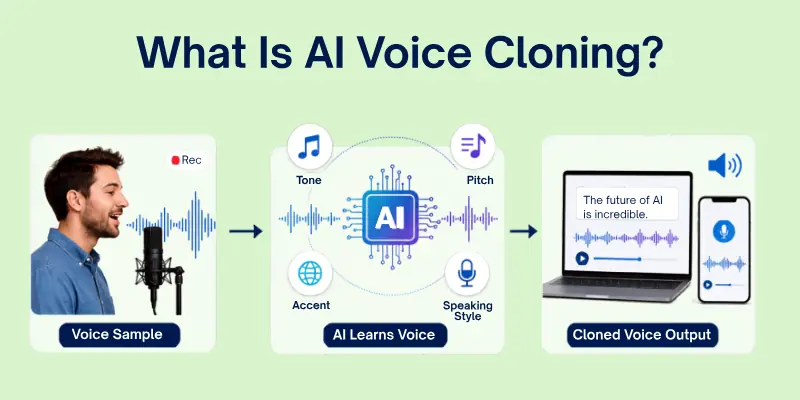
It’s different from plain text-to-speech voice cloning confusion aside, regular text-to-speech uses generic stock voices, while cloning is trained specifically on a real person’s recording.
How I Evaluated These Tools
I didn’t want to just list every tool with a “free” badge on its homepage, because half of them stop being free the moment you try to download anything. So each platform here was judged on:
- Audio quality: does the cloned voice actually sound human, or does it slip into that robotic uncanny-valley zone
- Free tier limits: character counts, credits, or word limits before you’re blocked
- Commercial rights: whether the free plan lets you use the audio in monetized content
- Ease of use: whether you need an account, a long script, or technical setup
- Sample length required: how much audio you need to upload to get a working clone
Quick Comparison Table
Before jumping into the full breakdown, here’s a fast side-by-side look at all tools.
| Tool | Free Tier Highlights | Commercial Use | Sign-Up Needed | Best For |
|---|---|---|---|---|
| ElevenLabs | 10,000 characters/month, up to 3 custom voices | No | Yes | Highest overall audio realism |
| Descript Overdub | 1,000-word one-time vocabulary | No | Yes | Fixing mistakes in existing recordings |
| Resemble AI | Guided 25-sentence recording for evaluation | No | Yes | Enterprise-style testing before upgrading |
| Murf AI | Free plan to explore editor and stock voices | Limited | Yes | Teams needing a full production studio |
| Uberduck | Limited monthly render credits | No | Yes | Fun, creative, and music-style voice projects |
| PlayHT | Free character allowance with instant cloning | No | Yes | Quick narration and voiceover testing |
| Fish Audio | Free monthly generations, clone from 10 seconds | Varies | Yes | Multilingual narration |
| KikiVoice | No sign-up, weekly resetting credits | Limited | No | Fast, no-commitment testing |
| Magic Hour | No sign-up, clone from 3 seconds of audio | No | No | Instant demos and drafts |
| Coqui XTTS-v2 | Fully open source, self-hosted | Yes | No | Developers who want full control |
| OpenVoice | MIT license, self-hosted | Yes | No | Developers needing commercial rights for free |
| RVC (w-okada) | Free, local real-time voice conversion | Yes | No | Streamers and live voice changing |
| so-vits-svc | Free, open source, self-hosted | Yes | No | Singing voice conversion |
Best Free AI Voice Cloning Tools
Now let’s go through each tool in detail. I’ve covered what each free plan actually gives you, where it falls short, and who it’s the best fit for.
1. ElevenLabs
ElevenLabs is widely considered one of the most natural-sounding AI voice cloning online platforms available today. Its Instant Voice Cloning feature is included on the free plan, letting you upload a short, clean audio sample and generate a working clone within seconds, as long as you have consent to use that voice.
The free tier includes a monthly character allowance and lets you create a handful of custom voices, which is enough to test quality on a short script or intro clip. The tradeoff is that voices created on the free plan cannot be used commercially, and the character allowance disappears fast if you’re producing regular content. I burned through mine testing a single 500-word script twice.
Best for: Creators who want the most realistic free sample before deciding whether to upgrade.
2. Descript Overdub
Descript takes a different approach. Instead of generating full voiceovers from scratch, Overdub is built into a full audio and video editing suite and is mainly used to fix mistakes in an existing recording. You type the correction, and Overdub speaks it in your cloned voice, matching the rest of the audio.
To create a clone, you read a longer script rather than a quick clip, which produces a more accurate result but takes more upfront effort. The free trial gives you a one-time word allowance rather than a monthly reset, so it’s better suited to occasional fixes than ongoing production.
Best for: Podcasters and video editors who need to correct flubbed lines without re-recording.
3. Resemble AI
Resemble AI is aimed at businesses and professional teams rather than casual users. Its free trial walks you through a guided recording process where you read a set of prepared sentences, which helps the model capture a wider range of your natural speech patterns.
The resulting clone is high quality, but the free tier is strictly for evaluation. You can’t download or commercially use the generated audio without upgrading, and the setup process takes longer than simple one-click free voice-cloner tools.
Best for: Teams evaluating a professional voice cloning workflow before committing to a paid plan.
4. Murf AI
Murf AI functions as a full voiceover studio, with tools for timing, effects, and team collaboration built around its voice library. It draws a clear line between instant cloning and its higher-quality professional cloning option.
Voice cloning itself sits mostly behind the paywall. The free plan lets you explore the editor and try the stock voice library, but you won’t get a fully usable custom clone without upgrading.
Best for: Teams that want a polished editor for corporate or e-learning voiceovers and are open to upgrading later.
5. Uberduck
Uberduck leans into creative and community-driven use cases rather than professional narration. It’s well known for text-to-speech that extends into singing and rap, along with a large public library of stylized voices.
You can upload a sample to create a custom clone for personal, non-commercial use, and the free plan includes a limited number of monthly render credits. Those credits run out fast if you’re experimenting with longer scripts, and honestly, that’s half the fun of it if you’re just messing around.
Best for: Fun, low-stakes projects like memes, parody clips, or short creative experiments.
6. PlayHT
PlayHT offers instant voice cloning alongside a large stock voice library, with a free character allowance that resets monthly. The cloning process is quick, usually just a short audio upload, and the interface is straightforward for beginners.
Like most free voice cloning software on this list, commercial usage rights and higher-quality cloning models are reserved for paid plans.
Best for: Testing narration quality before committing to a subscription.
7. Fish Audio
Fish Audio needs as little as ten seconds of audio to build a natural-sounding clone that can speak in multiple languages, which makes it genuinely useful if you’re producing content across different markets. It includes a free monthly generation allowance.
Best for: Multilingual voiceovers without re-recording in each language.
8. KikiVoice
KikiVoice runs entirely in the browser with no mandatory sign-up, which lowers the barrier for a quick one-off test. It supports multilingual voice cloning, meaning your cloned voice can speak in a different language than the one you originally recorded, across more than 75 languages.
Free credits reset weekly rather than monthly, and you can choose between three model tiers depending on whether you want speed or richer emotional expression.
Best for: Multilingual creators who want to test cloning without creating an account.
9. Magic Hour
Magic Hour is built for speed. There’s no sign-up requirement, and you can clone a voice from as little as three seconds of audio using either an upload or the built-in web recorder. This is the one I’d send to a friend who just wants to see the tech work without committing to anything.
The convenience comes with a tradeoff: audio quality and language support are more limited than dedicated platforms, and its commercial usage terms are less clearly defined.
Best for: Quick demos or testing a voice concept before investing time elsewhere.
10. Coqui XTTS-v2
For developers who want complete control, Coqui XTTS-v2 is an open-source voice cloning model you can run locally or on your own server, rather than a hosted web platform. It needs only about six to ten seconds of clean audio to produce a usable few-shot clone and supports more than a dozen languages, including cross-language synthesis.
Since there’s no subscription or character limit, it’s genuinely free, but you’ll need comfort with Python and, ideally, a GPU for reasonable performance.
Best for: Developers building custom applications who need full ownership of the model.
11. OpenVoice
Developed by MyShell and MIT researchers, OpenVoice is a self-hosted, open-source framework released under a permissive MIT license, which allows both personal and commercial voice cloning use without fees. Its one-shot cloning requires just a short clip and gives you control over emotional tone, rhythm, and pauses.
The barrier to entry is technical setup rather than cost. You’ll need a compatible GPU and some familiarity with command-line tools.
Best for: Developers who want commercial rights without paying for a hosted service.
12. RVC (Retrieval-based Voice Conversion)
RVC, commonly used through the W-Okada Realtime Voice Changer client, takes a different approach entirely. Instead of generating speech from text, it’s a real-time voice cloning tool that converts your live voice, changing its timbre while keeping your original pacing and intonation. It runs locally and is popular among streamers and gamers.
This is a voice converter, not a text-to-speech engine, so it’s not the right tool if you need to generate narration from a written script.
Best for: Real-time voice changing during livestreams or gaming.
13. so-vits-svc
so-vits-svc is another open-source, self-hosted option, built for high-fidelity voice conversion and especially popular for singing voice transformation. It requires more setup than most tools here, including training a custom model on your target voice, but there are no usage restrictions once it’s running.
Best for: Musicians and creators converting singing vocals into a different voice.
How to Clone a Voice for Free
Once you’ve picked a tool from the list above, the actual cloning process is fairly similar across most platforms. Here’s the general workflow so you know what to expect no matter which one you choose.
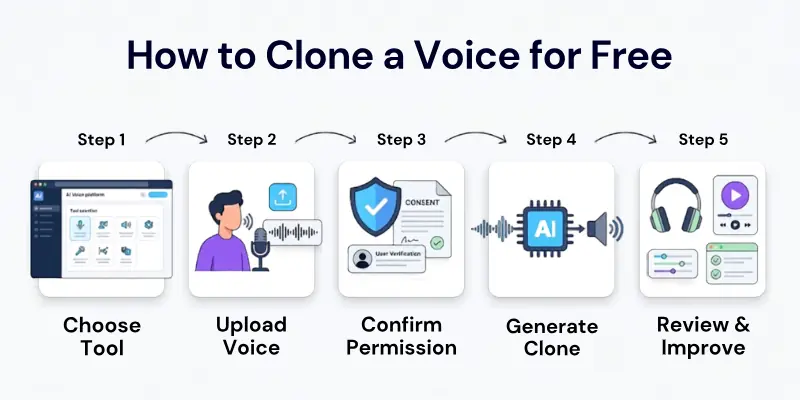
- Choose a tool that matches your use case. Pick a hosted platform like ElevenLabs or PlayHT if you want quick, no-setup cloning, or an open-source option like Coqui XTTS-v2 if you want full commercial rights without a subscription.
- Record or upload a clean audio sample. Most tools need somewhere between three seconds and one minute of clear speech with minimal background noise. A quiet room and a decent microphone make a noticeable difference in clone quality. I learned this the hard way, testing one in a room with a ceiling fan running.
- Confirm consent. Only clone voices you own or have explicit permission to use. Most reputable platforms will ask you to confirm this before processing your sample.
- Generate and review the clone. Type a short test script and listen closely for unnatural pacing, robotic tone, or mispronounced words.
- Adjust and regenerate if needed. If the first result sounds off, try a cleaner or longer sample. Background noise and inconsistent tone in the original recording are the most common causes of a weak clone.
Free vs Paid Voice Cloning
Free plans almost always come with tradeoffs that only become obvious once you try to use the output for real work:
- Character or word limits that reset monthly, or in some cases, are a one-time allowance
- No commercial license, meaning you legally can’t use the audio in monetized videos, ads, or client work
- Lower-quality models, with the more realistic “HD” or “professional” cloning tiers locked behind a paid plan
- Limited voice storage, so you may only be able to save one or two custom voices at a time
- Watermarked or non-downloadable audio on some evaluation-only free trials
If your project is personal, experimental, or a quick test, a free tier is usually enough. If you’re producing content for a business, client, or monetized channel, budget for a paid plan at some point, it’s coming either way.
Ethical and Legal Considerations
Voice cloning raises real concerns that go beyond typical software terms of service. Cloning someone’s voice without their permission can violate platform policies and, depending on your location, may carry legal consequences related to impersonation, fraud, or right of publicity laws. Reputable tools require you to confirm consent before processing a sample, and some, like Descript, restrict cloning to your own voice entirely.
Before publishing cloned audio, consider disclosing that it’s AI-generated, especially in contexts like advertising, journalism, or political content where listeners might otherwise assume it’s a real recording. Misuse of this technology, including deepfake audio used to deceive or defraud someone, is both unethical and increasingly targeted by new regulations.
Final Thoughts
Free AI voice cloning tools have gotten good enough to genuinely replace a voice actor for small projects, quick tests, and personal content. The right choice depends less on which tool has the flashiest features and more on what you actually need: a quick no-commitment test, a commercially usable clone, or full control through an open-source model.
Start with whichever free AI voice cloning tools match your use case, test it on your own script first, and only upgrade once you hit a real limitation rather than a hypothetical one.
Frequently Asked Questions
Here are some frequently asked questions about free AI voice cloning tools.
Some tools genuinely let you clone and generate audio at no cost within set limits, especially open-source models like Coqui XTTS-v2 and OpenVoice. Many hosted free AI voice generator platforms let you clone a voice for free but charge once you try to generate audio with it, so always check the commercial use terms before relying on a free plan.
Cloning your own voice is generally legal. Cloning someone else’s voice without their consent can violate a platform’s terms and, depending on your jurisdiction, may carry legal risk. Always get explicit permission before cloning another person’s voice.
Only with that person’s clear consent. Reputable platforms require confirmation of consent during setup, and using someone’s voice without permission can result in an account ban or legal exposure.
KikiVoice and Magic Hour both let you clone a voice without creating an account, making them the fastest options for a quick test.
Open-source, self-hosted models like Coqui XTTS-v2 and OpenVoice are the most realistic free voice cloning software for commercial projects, since they carry no licensing restrictions once you’re running them yourself. Among hosted platforms, most free tiers restrict commercial use, so check the license terms before publishing cloned audio in monetized content.
It depends on the tool. Some platforms like Magic Hour and Coqui XTTS-v2 can produce a rough clone from three to ten seconds of audio, while others like Descript and Resemble AI ask for a longer script to build a more accurate model.
Most of the hosted platforms on this list, including PlayHT, Fish Audio, and KikiVoice, work through a mobile browser without needing a dedicated app, though the open-source tools generally require a computer with a GPU.
Yes, several tools support this well. Fish Audio, KikiVoice, and Coqui XTTS-v2 all handle multilingual cloning, letting a single cloned voice speak in multiple languages without a fresh recording for each one.
A standard free text-to-speech tool uses pre-built stock voices that anyone can access. Voice cloning trains the model specifically on a sample of one person’s real voice, so the output sounds like that individual rather than a generic narrator.
It varies by platform. Tools like PlayHT and ElevenLabs typically allow downloads within your free character limit, while evaluation-focused platforms like Resemble AI often block downloads until you upgrade.


- Be Respectful
- Stay Relevant
- Stay Positive
- True Feedback
- Encourage Discussion
- Avoid Spamming
- No Fake News
- Don't Copy-Paste
- No Personal Attacks
- Be Respectful
- Stay Relevant
- Stay Positive
- True Feedback
- Encourage Discussion
- Avoid Spamming
- No Fake News
- Don't Copy-Paste
- No Personal Attacks
