Canva AI Review: Is It the Best AI Design Tool in 2026?
Published: 15 Apr 2026
Canva AI is changing how people create designs by combining automation, AI writing, and smart editing tools in one platform. Many people struggle with design skills, content ideas, and editing tools. This is where Canva AI comes in. It promises to make design and content creation faster, easier, and more accessible for everyone. I have personally used Canva AI for quick social media designs, and it saved me a lot of time.
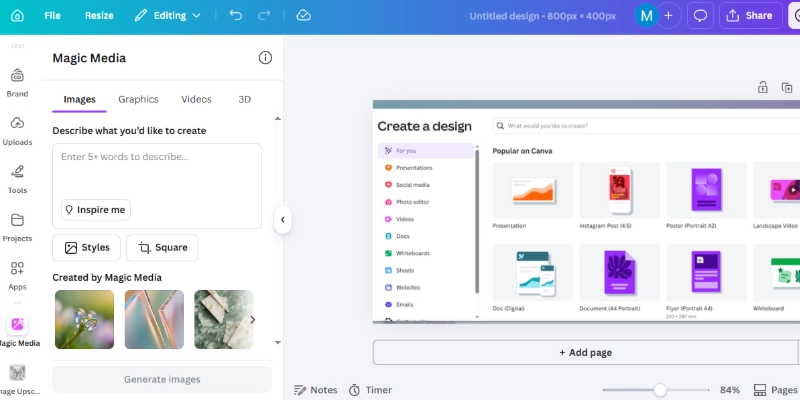
In this Canva AI review, you will learn everything about its features, pricing, pros and cons, and real performance. This guide will help you decide whether Canva AI is worth using in 2026.
What is Canva AI?
Canva AI is a collection of artificial intelligence tools built inside the Canva platform. Instead of being a single feature, it includes multiple AI-powered tools under one system called Magic Studio.
These tools help users create content, generate images, edit photos, design graphics, and even write text with minimal effort. Whether you are a beginner or a content creator, Canva AI simplifies complex tasks into a few clicks.
Quick Summary of Canva AI Review
- Overall Rating: 4.4/5
- Best For: Beginners, marketers, content creators
- Not Ideal For: Advanced designers and professionals
- Pricing: Free plan available, but the Pro plan is required for full features
Short Verdict: Canva AI is a wonderful all-in-one tool for quick and simple design work, but it may not replace advanced tools for professionals.
Key Features of Canva AI
The Canva AI system helps users create visuals, write content, and edit media quickly without technical skills. Below are the main features that make Canva AI a popular choice for beginners and professionals.
1. Magic Write
Magic Write helps you create text content like blog ideas, captions, product descriptions, and emails in seconds. It is a useful feature for AI content creation, especially for beginners who need quick writing support. You simply enter a prompt, and it generates content that is easy to refine.
It is useful for:
- Social media captions
- Blog outlines
- Short marketing content
However, the output sometimes needs editing to improve clarity and match your tone.
2. Magic Design
Magic Design lets you upload an image or enter a prompt, and it automatically generates multiple design templates. It is one of the most helpful automation features for users who want fast and ready-made visuals. This feature reduces manual effort and accelerates the design process.
It saves time by:
- Generating ready-made layouts
- Suggesting fonts and colors
- Creating social media posts instantly
This feature is perfect for users who do not have design experience.
3. AI Image Generator
This tool converts text into images by understanding your description and turning it into visuals. It is a growing feature in modern AI systems and works well for quick creative needs. You can create unique images without using complex software.
It works well for:
- Social media graphics
- Blog images
- Creative projects
The quality is decent, but not as advanced as specialized AI image generators.
4. Magic Edit and Background Remover
Canva AI makes photo editing basic and accessible for everyday users. These tools are part of its smart AI design suite, which focuses on speed and ease of use. You can edit images without any technical skills.
You can:
- Remove backgrounds in one click
- Replace objects in images
- Adjust colors and lighting
These tools are fast and beginner-friendly, making them very useful for daily design tasks.
5. AI Presentations and Video Tools
Canva AI can also create presentations and videos with minimal effort. It supports AI content creation by generating slides, adding text, and designing layouts automatically. This helps users save time on visual storytelling.
The tool is helpful for:
- Business presentations
- Educational slides
- Short marketing videos
This feature is ideal for users who want quick and professional visual content.
How Canva AI Works
Canva streamlines the entire design and AI content creation process into a few easy steps. You can create professional designs within minutes without using complex software.
- Sign up or log in to Canva: Create your account or access your dashboard to start using its AI design tools.
- Choose an AI tool: Select features like Magic Write, Magic Design, or the AI Image Generator based on your needs.
- Enter your prompt or upload content: Add a text prompt, image, or idea, and let Canva AI generate results instantly.
- Customize the result: Edit the design and adjust text, colors, or layout to match your style or brand.
- Download or share your design: Once satisfied, export your design or publish it directly on social media platforms.
The entire process takes only a few minutes, which makes Canva AI a great choice for fast and efficient content creation.
Canva AI Pros and Cons
Before choosing any AI tools, it is important to understand both the advantages and limitations. Canva AI offers many useful features for quick design, but it also has some drawbacks depending on your needs. Here is a balanced overview to help you decide.
| Pros |
|---|
|
| Cons |
|---|
|
This comparison helps you understand where Canva AI performs well and where it may fall short.
Canva AI Pricing Plan
Canva AI follows a freemium pricing model, which means you can start using it for free and upgrade as your needs grow. The platform offers multiple plans with different levels of access to design AI tools and features.
1. Free Plan: The free plan is a beneficial starting point for users who want basic design and AI content creation tools. It includes limited access to Canva AI features and a selection of templates.
- Cost: $0 per month
Includes:
- Basic design tools and editor
- Limited AI features like Magic Write usage
- Access to free templates and elements
- Around 5GB of cloud storage
2. Pro Plan: The Canva Pro plan unlocks the full potential of Canva AI and advanced design features. It is best for users who need regular content creation and professional results.
- Cost: Around $15 per month or $120 per year for individual users (billed annually).
Includes:
- Full access to all AI tools (Magic Write, Magic Design, background remover, AI image generator)
- Premium templates, photos, videos, and graphics
- Brand Kit for colors and logos
- 100GB+ cloud storage
3. Canva for Teams: Canva also offers a Teams plan designed for collaboration and business use. It includes all Pro features along with team management tools.
- Cost: Starts around $14.99–$20 per user per month (depending on plan and billing).
Includes:
- Everything in Pro
- Collaboration tools for teams
- Shared brand assets and controls
- Multiple user support
Canva AI Performance Review
From my personal experience, Canva AI works really well when you need quick and simple designs without wasting time. I have used it many times for social media posts and blog graphics, and it helped me finish tasks much faster than traditional design tools.
In real use, Canva AI performs best for everyday content creation where speed matters more than perfection. It feels very smooth and beginner-friendly, and I did not face any learning difficulties while using its features. However, sometimes I still had to make small edits to improve text or adjust design details.
- Speed: Fast and responsive, designs are generated in seconds
- Ease of Use: Very beginner-friendly and simple interface
- Output Quality: Good for basic social media and marketing needs
- Accuracy: Sometimes needs small manual adjustments
Overall, Canva AI is best for users who want quick results and easy AI design tools without spending too much time on complex editing.
👉 Start designing with Canva here.
Conclusion
After testing Canva AI in different use cases, it clearly stands out as a helpful solution for rapid digital content creation and simplified graphic production. It combines smart automation with an easy interface, which makes it useful for users who want quick results without complex learning.
For beginners, marketers, and small business owners, it offers a smooth workflow for designing posts, writing short text, and building visuals in less time. While it may not fully replace advanced professional software, it still performs well for everyday creative needs and light commercial work.
Overall, Canva AI is a solid choice for anyone looking for a convenient smart design platform, especially when speed, ease of use, and productivity matter more than advanced customization.
FAQs: About Canva AI Review
Canva AI works as a visual content generator that helps users create designs, posts, and creative assets quickly. It is useful for people who want fast and simple digital content without advanced skills.
It is very beginner-friendly because of its simple interface and ready-made tools. Many users prefer it as an accessible design automation platform for daily tasks.
Yes, it includes tools that support captions, blog ideas, and short text creation. It acts as a smart writing assistant tool for basic content needs.
It is useful for creating logos, social posts, and marketing materials for small businesses. Many users rely on it as a brand content creation system for quick branding work.
It is faster and easier but less advanced than professional tools. It is best considered a quick digital design solution for everyday users.
No, it cannot fully replace expert designers, but it helps with basic tasks. It works best as a supportive design productivity tool rather than a replacement.
Canva is worth using for quick and simple creative work. Many users see it as a modern digital content assistant for everyday projects.




- Be Respectful
- Stay Relevant
- Stay Positive
- True Feedback
- Encourage Discussion
- Avoid Spamming
- No Fake News
- Don't Copy-Paste
- No Personal Attacks
- Be Respectful
- Stay Relevant
- Stay Positive
- True Feedback
- Encourage Discussion
- Avoid Spamming
- No Fake News
- Don't Copy-Paste
- No Personal Attacks
