AI Tools for Image Generation That Create Stunning Visuals Fast
Published: 26 Jan 2026
AI tools for image generation now shape how people create visuals in today’s world. Recent industry reports show millions of images are generated every day using these tools. Businesses, creators, and students rely on them for faster and cheaper design work.
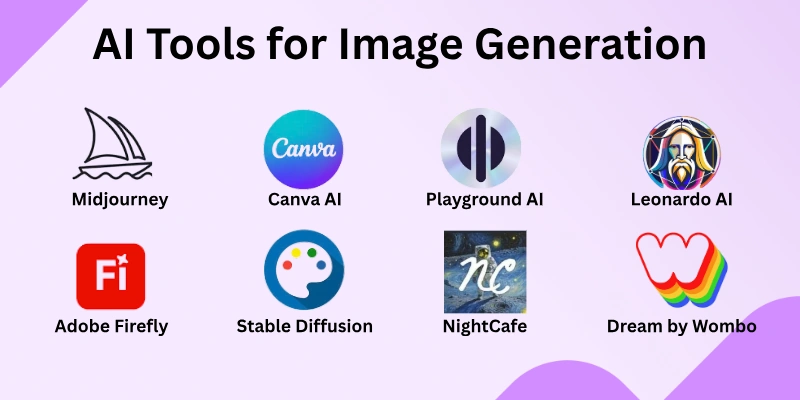
These tools turn simple text into images within seconds. I have used them in real projects and seen how much time they save. When you understand how they work, you get better results with less effort. In this article, I cover 10 AI tools that help you create better images with confidence.
Best AI Tools for Image Generation
AI image generation tools help users create visuals from text with speed and control. Each tool offers different strengths based on output quality and style flexibility. Below are the top tools selected for practical use.
1. Midjourney
Midjourney generates detailed and artistic images from text prompts. It is commonly used for illustrations and creative visuals. The tool provides strong control over style and composition. Users can experiment with different visual directions easily. The platform works well for both simple and complex ideas.
Best for: Artists and designers who focus on creative and stylized images.
Pricing Plan: Plans start at $10 per month, with higher tiers offering more generations and faster processing.
2. DALL·E
DALL·E creates images based on written descriptions with a focus on clarity and structure. It performs well for realistic visuals, illustrations, and concept-based graphics. The tool understands detailed prompts and delivers balanced compositions. It also supports quick revisions through prompt adjustments.
Best for: Users who need accurate and well-structured images from detailed text prompts.
Pricing Plan: Pricing works on a credit-based system, with usage costs depending on image generation volume.
3. Adobe Firefly
Adobe Firefly focuses on producing clean and commercially usable visuals. It integrates smoothly with creative workflows and design platforms. The tool offers controlled results with consistent visual balance. It supports multiple styles while maintaining brand-safe outputs.
Best for: Businesses and professionals who need images for commercial and marketing use.
Pricing Plan: Available through Adobe subscription plans, with limited free credits and paid monthly options.
4. Canva AI Image Generator
Canva AI Image Generator allows users to turn text into visuals quickly within an easy-to-use interface. It supports multiple formats, making it suitable for social media, presentations, and marketing content. The tool provides simple customization options while maintaining good image quality. It also enables quick resizing and editing without extra software.
Best for: Beginners and marketers who need fast, versatile, and ready-to-use visuals.
Pricing Plan: Included in the Canva Pro subscription, with limited free usage available for basic accounts.
5. Stable Diffusion
Stable Diffusion generates high-quality images from text prompts using open-source models. It excels at producing realistic visuals, abstract art, and complex scenes. The tool allows fine-tuning and customization for detailed image outputs. It can be used both online and locally, offering flexibility for different workflows.
Best for: Creators and developers who want customizable and high-resolution image generation.
Pricing Plan: Free to use with open-source access; paid cloud services offer faster processing and extended features.
6. Playground AI
Playground AI transforms text prompts into images with intuitive editing features. It offers both artistic and realistic output styles suitable for various projects. The platform allows users to adjust details and refine images quickly. It also supports collaboration and sharing within creative teams.
Best for: Users who want a flexible and interactive platform for generating and editing images.
Pricing Plan: Free basic plan available; paid subscriptions start at $15 when charged monthly for additional features and faster generation.
7. NightCafe
NightCafe allows users to generate images from text with multiple artistic styles. It focuses on creative freedom and visual experimentation. The platform offers simple controls for adjusting style strength and details. It also supports community challenges and shared creations.
Best for: Users who enjoy experimenting with artistic styles and creative visuals.
Pricing Plan: Free credits available; paid plans start at $10 per month for higher usage and extra features.
8. Leonardo AI
Leonardo AI specializes in creating high-quality, realistic, and stylized images from text prompts. It offers advanced customization options for styles, lighting, and scene details. The platform provides fast generation with consistent results across different prompts. It also supports model fine-tuning and community-shared templates for better output.
Best for: Artists and designers who want professional-quality visuals with advanced customization.
Pricing Plan: Free basic plan available; paid plans start at $12 per month for higher resolution images and faster processing.
9. Dream by Wombo
Dream by Wombo generates imaginative and artistic images from simple text prompts. It allows users to explore a variety of art styles and creative expressions. The platform offers easy-to-use controls for adjusting colors, composition, and mood. It also provides quick rendering, making it suitable for fast idea testing.
Best for: Users who want unique and creative visuals for art projects or personal use.
Pricing Plan: Free version available; premium plan starts at $8 per month for higher-quality output and faster generation times.
10. DeepAI Image Generator
DeepAI Image Generator creates visuals from text with a focus on speed and simplicity. It supports both realistic and abstract images and handles complex prompts well. The platform allows instant generation without advanced setup or configuration. It also provides an API for developers to integrate image creation into other applications.
Best for: Developers and casual users who need quick and simple image generation.
Pricing Plan: Free basic usage; paid plans start at $10 per month for extended usage and higher resolution outputs.
How AI Image Generation Works
AI image generation turns text prompts into visuals in seconds. It allows creators to produce realistic or artistic images without complex design software. Understanding the basic process helps get better results from these tools.
- Text-to-Image Generation: Converts written descriptions into digital images quickly.
- Diffusion Models: Gradually turn random noise into clear, high-quality images.
- GANs (Generative Adversarial Networks): Two AI networks compete to generate realistic images efficiently.
- Prompt Engineering Basics: Clear and descriptive prompts produce more accurate results.
- Style, Lighting, and Composition Control: Adding details improves the visual quality of generated images.
- Iterative Refinement: Repeated adjustments help achieve the desired output faster.
Conclusion
In this guide, we explored how AI tools for image generation help turn ideas into visuals with speed and ease. These tools offer clear benefits such as faster workflows, lower design costs, and easy access for beginners. At the same time, they can produce inconsistent results, require prompt practice, and sometimes limit creative control.
I have seen that results improve greatly with patience and experimentation. Used the right way, AI image generation tools can support creativity rather than replace it. Thank you for reading, and I hope this guide helps you choose and use these tools with confidence.
FAQs
Here are some frequently asked questions about AI image generation tools.
AI tools for image generation create images from text descriptions using trained models. They help users design visuals without manual drawing or advanced design skills. These tools are widely used for marketing, content creation, and creative projects.
AI image generators analyze text prompts and convert them into visual elements. Clear descriptions help the system produce more accurate and relevant images. Adding style or mood details can further improve the final output.
Some AI image generation tools offer free usage with limits. Commercial use depends on the platform’s license and usage terms. Always check usage rights before publishing or selling the images.
Yes, most AI image generation tools are beginner-friendly. They require simple text input and minimal technical knowledge. Many platforms also provide templates and prompt suggestions.
Text-to-image tools create visuals from written prompts. Image-to-image tools modify or enhance existing images using AI. Both serve different creative needs depending on the project goal.
Many image generation tools support commercial use. Users should always review licensing rules before using images for business. Some platforms offer safer options for brand and marketing use.
Inaccurate results often come from unclear or short prompts. Adding details about style, mood, and subject improves output quality. Testing multiple prompt versions usually gives better results.
AI image generation tools support design tasks but do not replace creativity. Professional designers still add strategy, originality, and refinement. AI works best as a supporting tool rather than a replacement.
Use clear, descriptive prompts and test different variations. Learning basic prompt techniques improves image quality over time. Regular practice helps users understand how the tools respond.
They may struggle with complex instructions or specific brand styles. Results can vary and often need refinement or multiple attempts. Some tools also have limits on resolution or customization.

- Be Respectful
- Stay Relevant
- Stay Positive
- True Feedback
- Encourage Discussion
- Avoid Spamming
- No Fake News
- Don't Copy-Paste
- No Personal Attacks
- Be Respectful
- Stay Relevant
- Stay Positive
- True Feedback
- Encourage Discussion
- Avoid Spamming
- No Fake News
- Don't Copy-Paste
- No Personal Attacks
