Leonardo AI Review: Is It Actually Worth Your Time in 2026?
Published: 26 Sep 2026
I opened a blank prompt box and typed eleven words, and forty seconds later I was staring at an image that looked like it belonged on a client’s moodboard, not something I made on a random Tuesday evening. That moment is exactly why so many people are searching for a Leonardo AI review right now. Everyone wants to know if this tool is genuinely that good or if the hype is doing most of the talking.
I spent real time inside Leonardo AI before writing a single word of this review, generating images, testing its video tools, digging through its pricing page, and pushing it until I found where it actually breaks. What you are about to read is not a rewritten spec sheet. It is what happened when I used it the way a real creator would.
What Is Leonardo AI?
Leonardo AI is a generative AI creative platform built for making images, videos, and edited visual assets from text prompts and reference images. But that one-line definition undersells what it has become.
Leonardo AI started as a text-to-image tool, similar in spirit to Midjourney, aimed at game developers, designers, and marketers who needed fast concept art. In 2024, Canva acquired Leonardo AI, and instead of folding it quietly into Canva’s own design suite, Canva let it keep growing as its own platform. That decision matters, because it explains why Leonardo today feels less like a single AI model and more like a creative workspace. It now hosts its own Lucid models alongside third-party models like Flux, Seedream, and GPT-based image generation, all inside one account.
So when someone asks what is Leonardo in simple terms, the honest answer is this: it is a multi-model image and video studio, not a one-trick generator.
Key Features: Leonardo AI
Leonardo AI packs in a lot, and it helps to walk through Leonardo AI features one at a time instead of dumping them all in a single paragraph.
1. Text-to-Image with Multiple Models
This is where most people start. You type a prompt, pick a model, and generate. What makes Leonardo different from a basic generator is that you are not locked into one visual style. If I type “a ceramic coffee cup on a wooden table, morning light, editorial photography style” using the Lucid Origin model, I get a clean, photorealistic result. Switch to a different model built for stylized or anime-style output, and the same prompt produces something completely different in tone. That flexibility is genuinely useful once you know which model fits which job.
2. Image-to-Video
Leonardo does not stop at still images. You can take an image you already generated or upload your own and turn it into a short video clip with camera movement and subtle motion added on top. For a product shot, this might mean a slow cinematic push toward the object with light shifting gently across it. It is not built to replace a dedicated video generator, but as a way to add motion to an image you already like, it works well enough for social content and mood pieces.
3. AI Canvas and Editing Tools
Once you have an image, Leonardo’s Canvas lets you extend it, remove parts of it, or regenerate a specific section without redoing the whole image. This matters more than it sounds. Instead of generating twenty full images hoping one lands perfectly, you can fix just the part that is wrong, like a background that clashes or an object that needs to move slightly.
4. Upscaling
The Universal Upscaler takes any image, even one you did not generate inside Leonardo, and increases its resolution while adding coherent detail rather than just stretching pixels. I tested this on a small, slightly blurry stock photo, and the 2x upscale came back sharp and usable. Pushing it to 4x introduced a few small artifacts, but it still held up better than a basic resize tool would have.
5. Texture and Asset Generation
For game developers specifically, Leonardo can generate seamless, tileable textures, useful for pattern work or 3D design, without needing a separate specialized tool.
My Experience Using Leonardo AI
I went in wanting two specific things: a clean product-style image and a short video clip made from that same image, since that is a realistic workflow for anyone doing content or marketing work.
For the image, I used the Lucid Origin model with a simple prompt describing a ceramic coffee cup on a warm table with morning light. The result actually impressed me.
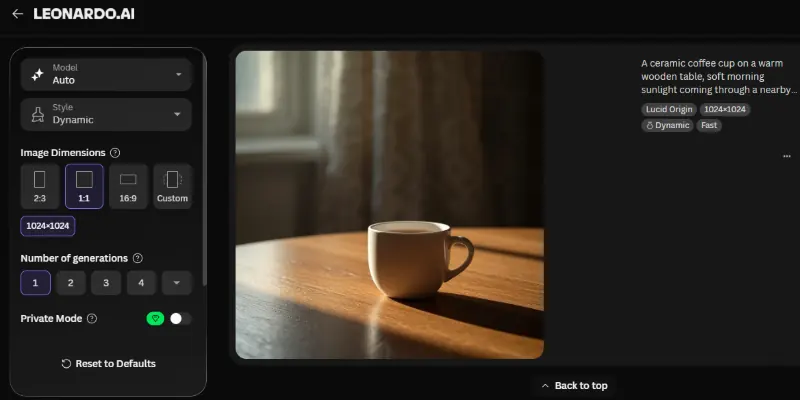
Here’s what stood out about it:
- The material read as real ceramic rather than a plastic-looking render
- The lighting fell across the table in a believable way
- There was no strange extra object or garbled text anywhere in the frame, which is where a lot of AI image tools quietly fall apart
Encouraged by that, I pushed further and tried a character portrait, since faces tend to expose problems that a simple product shot never will. Here the cracks showed.
The clothing and overall mood of the image looked genuinely cinematic, but a few things didn’t hold up on closer look:
- The skin texture looked slightly artificial once I zoomed into the face
- The eyelashes came out sharp and unnatural, almost drawn on rather than grown
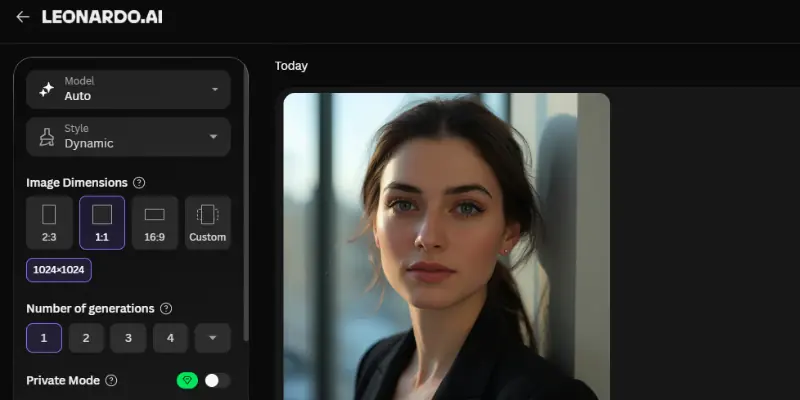
It was a reminder that Leonardo, like most image generators right now, is strong at mood and composition but still inconsistent at fine facial detail.
Then I moved to video. I took my coffee cup image and asked Leonardo to animate it with a slow push-in and rising steam.
Here’s how that went:
- The motion itself was smooth
- The cup and table shifted position slightly from the original still, so it did not feel like a perfect animation of the exact image I had made.
- It felt useful for a quick social clip or a mood reel, but not quite ready for a polished, client-facing product video without extra cleanup.
What stood out most through all of this was how much control Leonardo gives you and how that control cuts both ways:
- Switching between models to chase a slightly better result is genuinely satisfying.
- But it also means you can end up spending far more time in the app than you planned, simply because there is always one more model worth trying.
Leonardo AI Pricing
Leonardo AI pricing works on a token-based system layered under a few subscription tiers, and understanding tokens matters more than memorizing the plan names.
| Plan | Price (Monthly) | Fast Tokens | Best For |
|---|---|---|---|
| Free | $0 | 150 tokens per day | Testing the platform casually |
| Essential | Around $12/mo | 8,500 tokens/month | Light, regular personal use |
| Premium | Around $30/mo | 25,000 tokens/month | Frequent creators and small projects |
| Ultimate | Around $60/mo | 60,000 tokens/month | Heavy use and small teams |
Leonardo AI tokens are spent based on how demanding an action is. A basic image generation costs fewer tokens than a high-resolution upscale or a video generation, so two people on the same plan can burn through their allowance at very different speeds depending on what they actually make. Annual billing knocks the effective monthly price down on every paid tier, and once you run out of fast tokens, some models still let you generate through a slower, relaxed queue instead of stopping you completely.
So, is Leonardo AI free? Yes, there genuinely is a usable free plan, and it is enough to get a real feel for the platform before spending anything. Just know that regular use, especially with upscaling or video, moves through tokens faster than the sticker price alone suggests.
A quick note here. Pricing and token allowances on platforms like this change fairly often, so treat the numbers above as a general guide and check Leonardo AI’s official pricing page before you subscribe.
Pros and Cons of Leonardo AI
Here’s a quick, honest breakdown of what stood out during testing, both the good and the frustrating.
| Pros |
|---|
|
| Cons |
|---|
|
How Leonardo AI Compares to Other AI Tools
Leonardo AI does not exist in a vacuum, so it helps to see how it stacks up against the tools people compare it to most.
Leonardo AI vs. Midjourney
Anyone comparing Leonardo AI vs. Midjourney is usually trying to decide between two different personalities. Midjourney tends to produce a distinct artistic mood almost by default, even from a short prompt, which makes it a favorite for concept art and stylized illustration. Leonardo takes a more controllable, layered approach, with multiple models, in-app editing through Canvas, and built-in upscaling and video tools sitting alongside generation.
If you want strong artistic results with minimal fuss, Midjourney still has an edge. If you want more hands-on control over the final image, along with editing and video, in the same platform, Leonardo AI is the stronger fit.
Leonardo AI vs. DALL-E
Leonardo AI vs. DALL-E comes down to accessibility versus depth. DALL-E, especially through ChatGPT, is easier to reach for casually and handles complex, descriptive prompts well. It is a great option if you already live inside ChatGPT and just need an occasional image.
Leonardo pulls ahead once you need more than a single image, thanks to its model variety, Canvas editing, and image-to-video features. DALL-E is the quicker, simpler option for occasional use. Leonardo is the deeper tool for anyone doing this regularly.
Leonardo AI vs Canva AI
Since Leonardo AI is now owned by Canva, this comparison comes up naturally. Canva’s own built-in AI image tools are designed for speed inside a design workflow you are probably already using, generating an image without ever leaving your design canvas. Leonardo AI is the more specialized, deeper tool, with dedicated models, editing, and video features built specifically around AI generation rather than general design.
If you just need a quick image inside a design you are already building, Canva’s built-in tools are the faster path. If image and video generation is the actual point of what you are doing, Leonardo AI is the better fit, and its integration with Canva means moving between the two is fairly seamless.
Who Should Use Leonardo AI?
Leonardo AI is a good fit if you fall into one of these groups:
- Content creators and marketers who need product visuals or social content without a photoshoot
- Game developers who need concept art and textures quickly
- Designers who want more creative control than a single-model tool offers
Who Should Avoid Leonardo AI?
Leonardo AI may not be the right choice if any of these sound like you:
- You need consistently perfect faces for client-facing portrait work without retouching
- You want one simple model with no decisions to make, since Leonardo’s biggest strength, its range of models and tools, is also what adds a learning curve
- You are not willing to spend a little time learning how tokens and models work before you get comfortable
Final Thought
In this Leonardo AI Review, we covered what the platform is, its key features, real testing across images and video, current pricing and tokens, honest pros and cons, how it compares to Canva AI, Midjourney and DALL-E, and who it fits best.
My honest take is this: Leonardo AI earns its reputation, but it is not effortless. The image quality is genuinely strong, especially for product visuals and concept art, and having multiple models plus editing and video in one account is a real advantage over simpler tools. Where it asks more of you is patience. Faces still need a careful eye, and the token system takes a little getting used to. If you want control and are willing to spend a bit of time learning the platform, Leonardo AI is worth trying, starting with the free plan before committing to anything paid.
FAQs
Here are quick answers to the questions people ask most before trying Leonardo AI.
1. Is Leonardo AI free?
Yes. The free plan includes a daily token allowance that is enough to test image generation, models, and basic editing before deciding whether to pay for more.
2. Is Leonardo AI good for beginners?
You can generate your first image within minutes with no setup required. The learning curve shows up later, once you start exploring multiple models, Canvas editing, and video generation tools, since there are simply more decisions to make than with a basic single-model generator.
3. Is Leonardo AI better than Midjourney?
It depends on what you value more:
- Midjourney for a strong artistic mood with minimal setup
- Leonardo AI for hands-on control across multiple models, editing, and video in one place
Neither is universally better; they are built around different workflows.
4. How much does Leonardo AI cost?
Leonardo AI pricing starts at $0 for the free plan, with paid tiers generally running from around $12 to $60 a month depending on how many tokens you need. Confirm current numbers on Leonardo’s official pricing page, since plans do change.
5. Can Leonardo AI generate videos?
Yes, through its image-to-video feature, which adds camera movement and motion to an image you already have. It works well for short social clips, though results can shift slightly from the original source image.
6. What can I actually use Leonardo AI for?
Common use cases include:
- Product and marketing visuals
- Concept art and character design
- Game textures and assets
- Short social video clips from existing images
7. Does Leonardo AI own the rights to what I create?
Ownership and usage rights vary by plan, with free-tier generations typically visible to other users, while paid plans generally include commercial usage rights. Review Leonardo’s current terms directly, since licensing details can change and matter most for client or commercial work.
8. What are Leonardo AI tokens, and why do they matter?
Tokens are the currency behind every generation, and different actions use different amounts, depending on how demanding they are. A simple image costs less than a high-resolution upscale or a video generation, which is why two people on the same plan can run out of their monthly allowance at very different speeds.






- Be Respectful
- Stay Relevant
- Stay Positive
- True Feedback
- Encourage Discussion
- Avoid Spamming
- No Fake News
- Don't Copy-Paste
- No Personal Attacks
- Be Respectful
- Stay Relevant
- Stay Positive
- True Feedback
- Encourage Discussion
- Avoid Spamming
- No Fake News
- Don't Copy-Paste
- No Personal Attacks
