8 AI Tools for Teachers: Transform Your Classroom Efficiently
Published: 9 Feb 2026
More than 60 percent of educators use AI tools every week to plan lessons and save time. AI Tools for Teachers now support lesson planning, grading, and classroom engagement at scale. Schools adopt these tools because teachers face heavy workloads and limited prep hours. Teachers want simple tools that work without adding pressure.
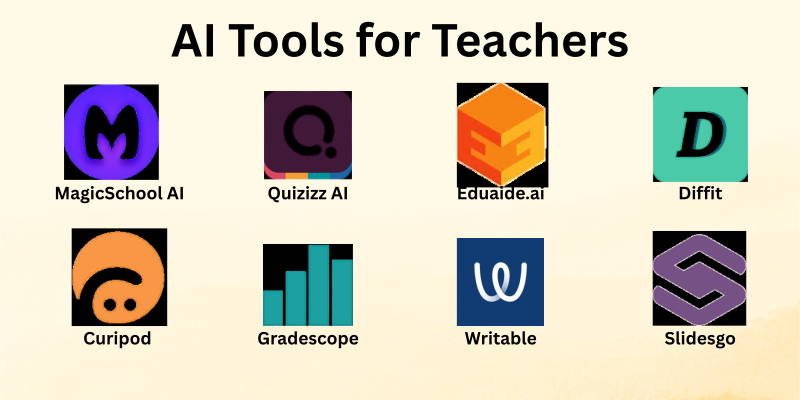
This article examines the top 8 AI teaching tools that improve planning, reduce stress, and support better teaching outcomes.
Best AI Tools for Teachers
Modern classrooms need smart support systems that reduce workload and improve lesson quality. These solutions help educators plan more quickly, teach more effectively, and manage daily tasks with ease.
Here are the best AI-powered tools for teachers that make daily teaching easier.
1. MagicSchool AI
MagicSchool AI is built specifically to support teachers in everyday classroom tasks. It helps educators create lesson plans, assessments, worksheets, and feedback in less time. The platform aligns content with learning standards and grade levels automatically. Teachers can customize outputs to match student needs and teaching goals. This makes it a trusted choice for educators who want practical results without complexity.
Let’s see the key features that make this tool helpful:
- Lesson Generator: Create structured lessons based on subject, grade, and objective.
- Assessment Builder: Design quizzes and tests with adjustable difficulty levels.
- Student Feedback Tool: Generate clear, constructive feedback quickly.
- Differentiation Support: Adapt content for diverse learning abilities easily.
Best for: Teachers looking to speed up daily planning without lowering instructional quality.
Pricing Plan: Offers a free tier for basic use, with premium plans starting at approximately $12/month when billed annually.
2. Curipod
Curipod brings energy into lessons by turning ideas into interactive classroom experiences. It helps instructors design engaging slides, live polls, and discussion prompts quickly. The system adapts activities based on student responses during sessions. Educators can keep attention high while encouraging participation from every learner. This platform works well for teachers who value interaction over static teaching.
Here are the key features of Curipod:
- Slide Creator: Build dynamic presentations with built-in engagement elements.
- Live Polls: Collect instant responses to guide lesson flow.
- Discussion Prompts: Encourage critical thinking through guided questions.
- Student Response Tracking: View participation data in real time.
Best for: Teachers who want to boost classroom engagement and student involvement.
Pricing Plan: Provides a free option with limited access, while paid plans begin at around $24 per month.
3. Quizizz AI
Quizizz AI supports learning through game-based activities and smart assessments. It allows instructors to generate questions, homework, and practice sessions in minutes. The system adjusts difficulty based on learner responses and progress patterns. Students stay motivated through competitive elements and instant results. This solution suits classrooms that value active recall and ongoing evaluation.
Let’s see the strength of Quizizz AI:
- AI Question Generator: Produce quizzes aligned with topics and objectives.
- Adaptive Practice: Automatically modify challenge levels for learners.
- Homework Mode: Assign self-paced activities outside class hours.
- Performance Insights: Review accuracy, pace, and participation data clearly.
Best for: Classrooms that prefer interactive assessments and continuous practice.
Pricing Plan: Includes a free version with essential functions, with paid plans offering monthly upgrades for advanced controls.
4. Gradescope
Gradescope simplifies evaluation by streamlining assignment review and scoring. It supports exams, homework, and coding tasks across multiple subjects. The platform groups similar answers to speed up marking and ensure fairness. Instructors can deliver clear comments while reducing manual effort. This tool fits well in settings where consistent assessment matters.
Here are the main features Gradescope does well:
- Answer Grouping: Cluster similar responses to grade faster.
- Rubric Management: Apply criteria consistently across submissions.
- Submission Support: Handle paper-based and digital work easily.
- Analytics Dashboard: Review score distributions and trends quickly.
Best for: Educators who need efficient grading for large or diverse classes.
Pricing Plan: Free access available for individual instructors, with institution-based plans priced separately.
5. Eduaide.ai
Eduaide.ai is designed to help teachers streamline lesson creation and content management. It generates detailed lesson plans, learning activities, and supporting materials in minutes. The platform allows customization to match curriculum standards and student needs. Educators can organize resources efficiently while maintaining high-quality instruction.
Key Features of Eduaide.ai:
- Lesson Plan Generator: Create complete, standards-aligned lesson plans quickly.
- Resource Library: Access ready-made worksheets, activities, and exercises.
- Customizable Templates: Tailor materials to specific classes or learning objectives.
- Time Management Tools: Organize lessons and schedules efficiently.
Best for: Teachers looking for fast, organized, and curriculum-ready lesson preparation.
Pricing Plan: The free tier is available with basic features, while paid plans start at approximately $6 per month.
6. Writable
Writable helps teachers enhance student writing through guided practice and feedback. It provides templates, prompts, and automated suggestions for assignments. The platform allows educators to give personalized comments quickly and track progress over time. Students can improve their writing skills with structured support and clear guidance.
Here are the key features that make this tool helpful:
- AI-Powered Writing Prompts: Generate assignments that match learning objectives.
- Automated Feedback: Give instant suggestions for grammar, structure, and style.
- Progress Tracking: Monitor student improvement across assignments.
- Peer Review Tools: Encourage collaborative learning and constructive feedback.
Best for: Teachers aiming to strengthen student writing and provide meaningful feedback.
Pricing Plan: Offers a free basic plan, while paid plans begin with monthly upgrades.
7. Diffit
Diffit is a tool that helps teachers simplify content creation and differentiate instruction for diverse learners. It can generate multiple versions of worksheets, quizzes, and learning materials tailored to different skill levels. The platform ensures all students can access content that matches their pace and understanding. Educators save time while providing personalized learning experiences for every student.
Let’s see the key features of Diffit:
- Content Differentiation: Create multiple versions of lessons for different learner levels.
- Worksheet Generator: Produce exercises quickly based on topics and standards.
- Customizable Templates: Adjust activities to suit classroom goals.
- Student-Centered Design: Ensure materials are accessible and engaging for all learners.
Best for: Teachers need to provide personalized lessons for students with varying abilities.
Pricing Plan: Offers a free basic plan with limited features, while premium paid access unlocks more features.
8. Slidesgo
Slidesgo allows teachers to create eye-catching presentations in minutes. It provides a vast collection of professionally designed templates suitable for lessons and projects. Educators can personalize designs by adjusting colors, text, and layouts to fit their class needs.
Here are the key features of Slidesgo:
- Extensive Template Library: Access diverse themes for different subjects and topics.
- Easy Customization: Modify text, images, and layouts to match teaching goals.
- Visual Elements: Use illustrations, icons, and graphics to enhance clarity.
- Download Flexibility: Export slides for presentations online or offline.
Best for: Teachers need quick, professional-quality slides for lessons and activities.
Pricing Plan: Offers a free tier with limited templates; premium subscriptions begin at approximately $3 to $6/month when billed annually.
Best Practices for Using AI in Teaching
Using AI tools in the classroom can make teaching more efficient, but it works best when applied thoughtfully. Following a few practical strategies ensures that both teachers and students benefit without compromising learning quality.
- Maintain Academic Integrity: Always verify AI-generated content and cross-check sources to ensure originality.
- Balance Human Oversight: Use AI to assist with grading and feedback, but review final assessments personally.
- Prioritize Student-Centered Learning: Integrate AI tools in ways that support individual learning styles without replacing teacher guidance.
- Set Clear Boundaries: Define when and how AI should be used to prevent over-reliance by students or staff.
- Encourage Critical Thinking: Ask students to analyze AI outputs rather than accept them blindly, fostering deeper understanding.
- Regularly Review Tool Effectiveness: Monitor which AI applications genuinely improve learning outcomes and adjust usage accordingly.
- Protect Privacy and Data: Ensure student information is secure when using AI platforms and comply with school policies.
Challenges & Ethical Considerations
While AI tools offer incredible support for teachers, they also bring important challenges that must be addressed.
Being aware of these issues helps educators use technology responsibly and maintain a safe learning environment.
- Bias in AI Outputs: AI systems can reflect biases in data, which may affect fairness in grading or content recommendations.
- Data Privacy: Handling student information securely is essential to prevent leaks or misuse of sensitive data.
- Compliance Concerns: Schools must follow guidelines and regulations when implementing AI to ensure ethical use.
- Impact on Teaching Roles: Over-reliance on AI can shift responsibilities and change how teachers interact with students.
- Transparency of AI Decisions: Teachers should understand how AI tools generate results to explain them clearly to students and parents.
Despite these challenges, when applied carefully, AI can enhance learning without compromising integrity. Addressing these concerns upfront builds trust and makes both teachers and students more confident in using these tools effectively.
Conclusion
In this guide, we explored the 8 top AI tools for teachers and how they can transform classroom planning, engagement, and assessment. When used thoughtfully, these tools can truly enhance teaching, though they are most effective when combined with a teacher’s expertise and personal touch. Even the most advanced tools feel meaningful only when they support genuine connection with students.
By embracing AI responsibly and creatively, educators can make their classrooms more dynamic and effective. Start small, experiment wisely, and let these tools complement your skills. You’ll find the difference in both your workflow and student engagement.
FAQs
If you’re more curious about the best AI tools for teachers, here are some common questions people often ask.
AI for teachers supports personalized learning by adapting lessons to each student’s pace and skill level. It also helps track progress, giving educators insights to improve engagement and outcomes.
Yes, AI-powered tools for education are generally safe when used responsibly. Teachers should ensure student data privacy and comply with school policies while leveraging these tools.
Absolutely. AI teacher tools assist with grading, lesson planning, and content creation, allowing educators to focus more on teaching and student interaction.
Educational AI tools like Curipod and Presentia AI make lessons interactive with polls, quizzes, and live activities, keeping students involved and motivated during class sessions.
No. AI tools for teachers are designed to assist rather than replace instructors. They provide support for tasks like planning and assessment while teachers maintain control of instruction and decision-making.
Most AI tools for the classroom cover multiple subjects, including STEM, languages, and arts. They can adapt content to suit different learning objectives and skill levels.
Over time, AI-powered tools for education streamline daily tasks, improve lesson effectiveness, and provide insights on student performance, helping teachers grow professionally and teach more efficiently.



- Be Respectful
- Stay Relevant
- Stay Positive
- True Feedback
- Encourage Discussion
- Avoid Spamming
- No Fake News
- Don't Copy-Paste
- No Personal Attacks
- Be Respectful
- Stay Relevant
- Stay Positive
- True Feedback
- Encourage Discussion
- Avoid Spamming
- No Fake News
- Don't Copy-Paste
- No Personal Attacks
