Top 10 AI Tools for Content Creation: I’ve Actually Tested
Published: 3 Jan 2026
Recent surveys show that over 80 percent of digital teams now rely on AI content creation tools to speed up writing and planning. I work with these tools every day, and I see how much time they save when used well.
I use AI content creation tools to draft ideas, shape messages, and keep content on schedule. They help me stay sharp and deliver faster results to my clients. I track my output each week, and I always see a clear jump when I use these tools. I also notice fewer mistakes because the tools guide my structure.
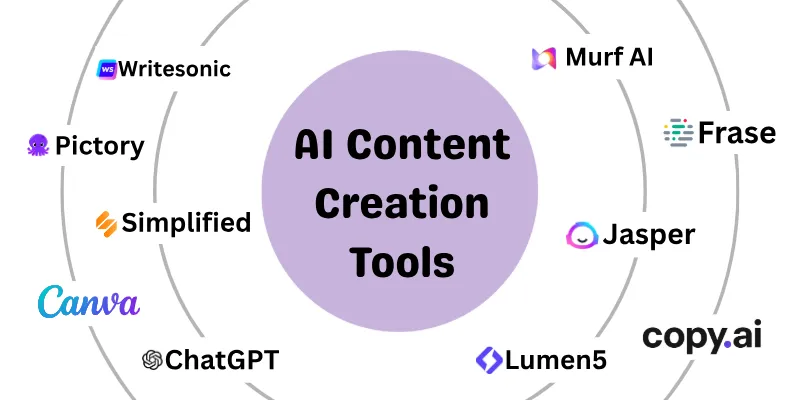
In this article, I will show you the top 10 AI content creation tools that help you save time, improve your drafts, and stay confident in your work.
Top 10 AI Content Creation Tools
Creating content takes time, but AI tools make it fast and easy. They help you write articles and social media posts and even create videos.
Here are the top AI content creation tools you can use right now.
- ChatGPT
- Jasper AI
- Pictory
- Canva
- Murf AI
- Lumen5
- Frase
- Writesonic
- Simplified
- Copy.ai
Let’s look at them in detail.
1. ChatGPT
ChatGPT, developed by OpenAI, is a powerful AI tool that helps you create high-quality content quickly. It can write blogs, social media posts, emails, scripts, and more, and it now supports advanced features like real-time collaboration, improved fact-checking, and multiple languages. Ideal for bloggers, marketers, students, and content creators.
Let’s see the main features to make ChatGPT useful:
- Generates blogs, emails, social posts, and more.
- Supports multiple languages and writing tones.
- Can summarize content and answer questions.
- Provides creative ideas and suggestions.
Pricing
- Free Plan: $0/month – limited usage.
- ChatGPT Plus: $20/month – Access to GPT-4, faster responses, and priority support.
2. Jasper AI
Jasper AI is designed for marketers and content creators who need high-quality marketing copy quickly. It can generate blog posts, ads, social media content, and more. Jasper AI integrates with SEO tools, helping content rank higher in search engines. While powerful, it may require human editing for tone and flow.
Here are the key features that make this tool helpful:
- AI-generated blogs, social posts, & ad copy.
- SEO-friendly content suggestions.
- Templates for different content types.
- Team collaboration features.
Pricing
- Pro Plan: $69 per month – Short-form content and templates.
- Custom Plan: Long-form content, SEO features, and priority support.
3. Pictory
Pictory is an AI tool for creating videos from text, such as blogs or scripts. It automatically summarizes content, adds visuals, and produces ready-to-share videos. It’s great for marketers and content creators, but it has basic video editing capabilities.
Here are the main features, things Pictory can do:
- Converts blogs or scripts into videos.
- Stock images and video library.
- Supports subtitles and captions.
- Beginner-friendly video production.
Pricing
- Free Trial: Limited video creation options.
- Starter Plan: $19 per month – Full video creation features.
- Professional Plan: $29 per month – Extended features, more exports.
4. Canva
Canva adds smart features to the popular graphic design platform. Users can create social media posts, presentations, and marketing visuals with AI-generated elements. While very user-friendly, advanced AI features require a paid plan.
Here are some features it can do:
- AI text-to-image generation.
- Templates for social media, marketing, and presentations.
- Background remover and design suggestions.
- Easy drag-and-drop interface.
Pricing:
- Free Plan: $0 per month – Basic templates and features.
- Pro Plan: $12.99 per month – Full AI tools and unlimited storage.
5. Murf AI
Murf AI is an AI voiceover tool for creating realistic narrations for videos, podcasts, and audiobooks. Users can choose different voices and accents. While high-quality, free usage is limited.
Here are the strengths of Murf AI:
- Converts text to natural-sounding speech.
- Supports multiple languages and accents.
- Voice customization options.
- Easy integration with videos and presentations.
Pricing:
- Free Trial: Limited voiceovers.
- Creator Plan: $19 per month – Access to more voices and features.
- Business Plan: $66 per month – Advanced voices and commercial use.
6. Lumen5
Lumen5 is an AI video creation tool that turns text content into engaging videos. It’s ideal for marketing videos and social media campaigns. Editing options are simple but effective for beginners.
Here are the key features that make this tool helpful:
- Converts blogs and scripts to videos.
- Storyboard templates and auto-summarization.
- Stock media library included.
- Drag-and-drop interface.
Pricing:
- Free Plan: Limited videos with the Lumen5 watermark.
- Basic Plan: $29 per month – Full HD videos and no watermark.
- Starter Plan: $79 per month – Advanced features and team collaboration.
7. Frase
Frase is an AI content tool focused on SEO optimization. It helps create long-form blog posts, research content, and improve search engine rankings. Beginners may need time to explore its features fully.
Let’s see the main features that make Frase useful:
- AI writing for blogs and web pages.
- SEO scoring and optimization.
- Research assistant for competitive analysis.
- Supports multiple languages.
Pricing:
- Starter Plan: $45 per month – AI writing and SEO features.
- Professional Plan: $115 per month – Advanced SEO and collaboration features.
8. Writesonic
Writesonic is an AI platform for content creators needing blogs, landing pages, and marketing copy. It includes tools for SEO optimization and image generation. While it generates content quickly, some outputs may require editing.
Here are the main features Writesonic does well:
- AI writing for blogs, ads, and landing pages.
- SEO optimization is included.
- Text-to-image generation.
- Multiple languages and content styles.
Pricing
- Free Trial: Limited credits.
- Basic Plan: $49/month – Core features and credits.
- Standard Plan: $99/month – Full features and higher usage limits.
9. Simplified
Simplified is an all-in-one AI tool for creating content like social media posts, blogs, and short videos. It’s perfect for small businesses, solopreneurs, and marketers who want an affordable, beginner-friendly platform. It includes AI writing, design tools, and team collaboration features.
Here are the key features Simplified can do:
- AI writing for blogs, social media, and ads.
- Graphic and video design templates.
- Multi-platform publishing.
- Team collaboration tools.
Pricing
- Free Plan: $0/month – Basic AI tools and templates.
- Pro Plan: $29/month – Full access to AI content and design tools.
10. Copy.ai
Copy.ai is an AI tool for marketing and creative writing. It helps create social media posts, product descriptions, emails, and ad copy. It’s suitable for small businesses, marketers, and content creators who need fast, polished content. Copy.ai saves time by generating ideas instantly.
Let’s look at the main features that make Copy.ai useful:
- Generates social posts and emails.
- Offers ready-made templates.
- Tone customization options.
- Supports multiple languages.
Pricing
- Free Plan: $0/month – Limited words per month.
- Chat Plan: $29/month – Unlimited words, priority support, full features.
- Agent Plan: $249/month – Everything in chat, Train Content Agents for your team using Content Agent Studio
Note: Pricing plans are not guaranteed and may change, so visit the official websites for updates.
Conclusion
In this article, we have covered AI content creation tools. These tools offer a smart way to create content for blogs, social media, videos, and more. Our suggestion is to choose tools that match your needs and manage them with clear goals and regular review.
When AI tools are used wisely and combined with human creativity, they become powerful and reliable helpers in content creation. This balanced use helps maintain quality and trust.
Thank you for reading this guide with patience and interest. We hope it added real value to your content journey.
Don’t skip the next part of the FAQs. I hope you will find something more interesting.
FAQs
Below are some of the most common questions people ask about AI content creation tools.
Yes, AI writing tools are safe to use when handled properly. However, human review is important to ensure accuracy, tone, and originality. When combined with editing and fact-checking, they are reliable for long-term content use.
- Always review content before publishing.
- Add your own voice and examples.
- Use plagiarism checks if needed.
AI-assisted writing tools support writers by speeding up the writing process. They suggest content ideas, sentence structures, and improvements while you stay in control. Manual writing relies fully on human effort, while AI adds automation and efficiency. Together, they create better results in less time.
Yes, beginners can easily use an AI writing service without any technical skills. Most platforms have simple interfaces and ready-made templates. You only need to enter a topic or prompt to get started. Over time, beginners learn how to give better instructions for better results.
AI marketing content creation helps brands stay consistent across channels. It allows faster creation of ads, social posts, and campaign content. This consistency improves brand visibility and audience engagement. With human review, it can deliver reliable results.
Many readers ask, What is the best AI for writing?, but the answer depends on your needs. Some tools are better for blogs, while others focus on marketing or SEO. The best option is one that matches your goals and budget. Testing a free plan is often the smartest way to decide.
An SEO AI writer tool helps optimize content for search engines by suggesting keywords and structure. It can improve readability and on-page SEO elements. However, rankings also depend on content quality and user value.
- Helps with keyword placement
- Improves content structure
- Needs human SEO review
Many users wonder how to use AI to generate content effectively. The best way is to start with clear prompts and specific instructions. AI then creates drafts that you can improve and personalize. This process saves time while keeping quality high.
- Start with a clear topic.
- Edit and refine the output
- Add personal insights
Yes, AI marketing content creation is very useful for small businesses. It helps create ads, emails, and social media posts quickly. This reduces costs and saves time for teams with limited resources. With proper review, it delivers consistent and professional content.
AI content creation tools cannot fully replace human writers. They are designed to assist, not replace, creativity and critical thinking. Humans are still needed for storytelling, emotion, and trust-building. The best results come from using AI and humans together.
- AI handles speed and structure.
- Humans add creativity and emotion.
- Balance improves content quality.
Managing multiple AI tools is easier with clear goals and workflows. Use one tool for writing, another for visuals, and one for SEO if needed. Avoid using too many tools at once to stay organized. Regular reviews help you keep quality consistent.




- Be Respectful
- Stay Relevant
- Stay Positive
- True Feedback
- Encourage Discussion
- Avoid Spamming
- No Fake News
- Don't Copy-Paste
- No Personal Attacks
- Be Respectful
- Stay Relevant
- Stay Positive
- True Feedback
- Encourage Discussion
- Avoid Spamming
- No Fake News
- Don't Copy-Paste
- No Personal Attacks
