Runway ML Review: Everything You Need to Know Before Paying
Published: 30 Aug 2026
AI video generators have changed a lot in a short time. A few years ago, getting a decent AI-generated clip usually meant accepting strange movements, inconsistent characters, or videos that looked obviously artificial. Today, tools such as Runway can produce much more polished footage from a simple prompt or reference image.
But there is a catch.
Good-looking demos do not always tell you whether an AI video tool is actually worth paying for. The real questions are different: How easy is it to use? How quickly do credits disappear? How much control do you have over the result? Can you use the videos for professional projects? And does it still make sense when cheaper competitors are available?
That is what this Runway ML review focuses on.
Runway ML Review at a Glance
| Category | Rating |
|---|---|
| Video Quality | 4.8/5 |
| Features | 4.8/5 |
| Ease of Use | 4.5/5 |
| Creative Control | 4.7/5 |
| Pricing | 4.0/5 |
| AI Video Generation | 4.8/5 |
| Overall | 4.5/5 |
- Best for: Content creators, filmmakers, marketers, designers, agencies, and people who want an all-in-one AI video workspace.
- Free plan: Yes, with 125 one-time credits.
- Flagship video model: Gen-4.5
- Main strength: High-quality video generation combined with a broad set of creative tools.
- Main weakness: Credit consumption can become expensive when you need many attempts.
What Is Runway ML?
Runway ML is a browser-based creative AI platform designed mainly around video creation, editing, image generation, and other media workflows.
The platform has evolved considerably from its earlier AI video-generation days. It is no longer simply a website where you type a sentence and wait for a video. Runway now brings several parts of the creative process together, including generative video, image tools, video editing, performance capture, and workflows.
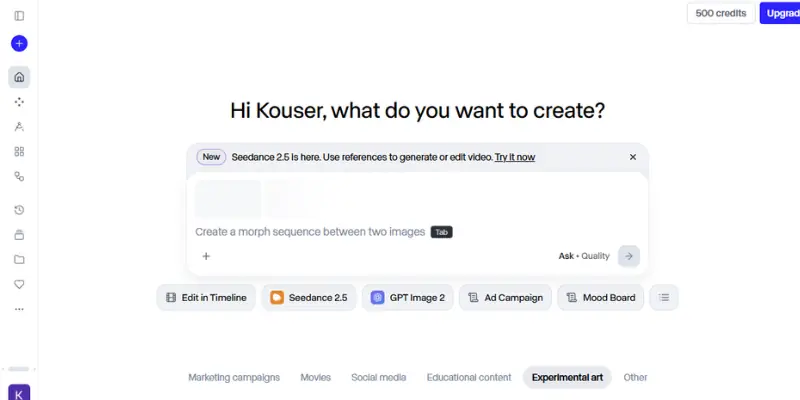
Its current flagship video model is Gen-4.5, which supports both text-to-video and image-to-video generation on Standard plans and above. Runway lists Gen-4.5 at 12 credits per second, with generation lengths between 2 and 10 seconds.
This makes Runway particularly interesting for people who want to create short cinematic shots, social media content, product visuals, advertising concepts, B-roll, storyboards, and experimental video.
The important point is that Runway is trying to become a complete creative environment rather than competing only on one video-generation feature.
How Does Runway ML Work?
The basic process is simple.
You choose a tool or model, describe what you want, provide an image when required, generate the result, and then refine it.
A typical workflow looks like this:
- Choose a video generation or editing tool.
- Enter your prompt.
- Add a reference image if your workflow requires one.
- Select the appropriate model.
- Generate the clip.
- Review the result.
- Change the prompt or input if necessary.
- Generate another version.
- Download or continue editing the final result.
The simplicity is one of Runway’s strengths. You do not need to understand video production software before getting started.
However, there is a learning curve once you move beyond simple prompts. Getting a specific camera movement, subject action, lighting setup, or scene composition requires more thoughtful instructions.
That is normal for AI video generation. The tool can do a lot, but the quality of your input still affects the result.
Runway ML Features
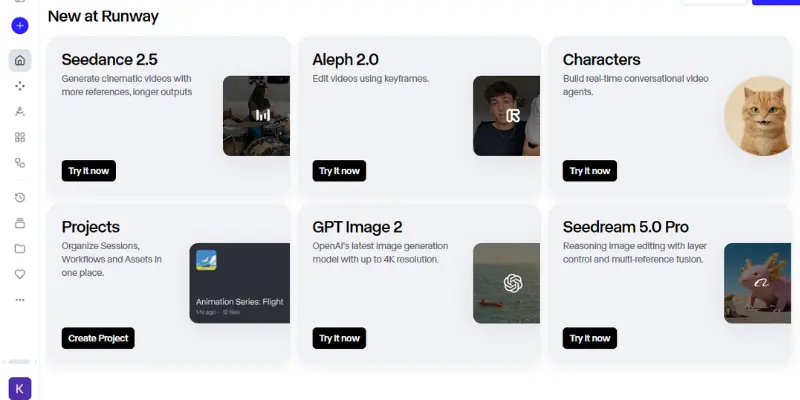
Runway has a much wider feature set than many basic AI video generators. The exact tools available can change as the platform develops, but these are the areas that matter most.
1. Gen-4.5 Video Generation
Gen-4.5 is the feature that will attract most people to Runway.
It supports both text-to-video and image-to-video generation. Runway currently lists 12 credits per second and supports clips from 2 to 10 seconds. The model outputs video at 720p and supports several aspect ratios, including landscape, portrait, square, and wider cinematic formats.
The important improvement is not simply resolution.
What matters is how well the model understands a scene.
For example, imagine you want:
“A young woman walking through a rainy Tokyo street at night, neon signs reflecting on the wet pavement, slow cinematic camera movement, shallow depth of field.”
A weaker generator may understand the basic concept but struggle with the movement, lighting, reflections, and camera direction.
A stronger model can produce a much more coherent interpretation of the complete scene.
That is where Gen-4.5 becomes interesting.
2. Gen-4 and Gen-4 Turbo
Gen-4 is still useful when you want a balance between quality and cost.
Runway lists Gen-4 at 12 credits per second and Gen-4 Turbo at 5 credits per second. Runway itself recommends experimenting with Turbo before moving to the more expensive generation when you are still working out an idea.
This is actually good advice.
You do not need the most expensive model for every experiment.
If you are testing whether a concept works, use the cheaper option first. Once you know what you want, spend more credits on the final version.
That simple habit can make a noticeable difference to your monthly credit usage.
3. AI Video Editing
Runway is also useful when you already have footage.
Instead of generating everything from scratch, you can use AI-assisted tools to transform or edit existing content.
This makes the platform more practical for creators who want to combine traditional footage with generated elements.
For example, you might have a real product video but want to change the environment, remove an unwanted object, or create a different visual treatment.
That is a very different workflow from simply generating a video from text, and it is one reason Runway feels more like a creative studio than a standalone generator.
4. Aleph for Video Editing
Aleph is designed around AI-assisted video editing and transformation.
This type of feature is useful when you already have footage and want AI to make specific changes rather than starting with a blank prompt.
For a content creator, that can mean fewer trips between different tools.
Instead of generating a clip on one website, editing it somewhere else, and using another service for additional visual changes, more of the process can happen inside Runway.
That does not mean Runway replaces every professional editing application. In fact, Runway itself says its traditional video editor is no longer being actively maintained and recommends a local video editor for larger projects requiring more extensive editing.
5. Act-Two Performance Capture
Another interesting part of the platform is Act-Two.
The feature allows creators to use performance input to drive a character. This can be useful for animation, character-based storytelling, short films, and experimental content.
Instead of manually animating every movement, creators can provide performance information and let AI translate it into the generated character.
This is particularly useful for people who want to create animated characters without building a traditional animation pipeline.
6. AI Image Generation
Runway is not limited to video.
You can also create images that can then become part of your video workflow.
This is useful because image generation and video generation often work better together.
For example, you could first create a character concept, refine the visual style, and then use that image as the starting point for an animated scene.
That approach gives you more control than asking a video model to invent everything at once.
7. Workflows
Workflows are another feature worth paying attention to if you plan to use Runway regularly.
They allow creators to build repeatable creative processes rather than manually performing every step.
This becomes useful when a project involves several stages.
For example:
Generate image → modify image → animate image → create variations → prepare final output
Instead of treating every generation as an isolated task, workflows can connect different steps into a more organized process.
For casual users, this may be unnecessary.
For agencies, professional creators, and people producing content repeatedly, it can become much more valuable.
My Real-World Test Example: Where Runway Makes Sense
One of the easiest ways to understand an AI video tool is to imagine a realistic content project instead of looking at a perfect promotional demo.
Suppose I need a short social media video for a fictional coffee brand.
I might start with a prompt describing a close-up shot of a hot coffee cup on a wooden table, morning sunlight coming through a window, steam rising from the cup, and a slow camera push toward the product.
The first generation might look impressive but still have something I want to change.
Maybe the camera moves too quickly. Maybe the steam is not convincing.Maybe the cup changes slightly between frames.
Instead of expecting the first generation to be perfect, I would treat that output as a draft. I could shorten the prompt, make the camera instruction clearer, change the reference image, or try a different model.
This is the part many AI video reviews leave out.
The first generation is not always the final result.Your real cost is not just the price of the successful video. It is the cost of the attempts you make before reaching something usable.
That is why Runway’s credit system matters so much.
Runway ML Video Quality Test
Instead of just saying “the quality is excellent” and moving on, I ran Gen-4.5 through a set of specific tests to see where it actually holds up and where it doesn’t.
- Realism: Lighting, texture, and physical detail were consistently strong, especially in outdoor and nature scenes.
- Motion Quality: This is where Gen-4.5 impressed me most. Object weight and momentum felt physically grounded rather than floaty, which is a common weak point in AI video.
- Prompt Accuracy: Multi-step prompts (subject action, then a camera move, then a lighting change) were followed correctly in most attempts, though complex prompts occasionally needed a regeneration.
- Human Characters: Faces and expressions held up well in close-ups, but subtle hand and finger movements still occasionally looked slightly off, a known weak spot across most AI video models, not just Runway’s.
- Camera Movement: Pans, pushes, and pulls were smooth and intentional rather than jittery, which made a real difference in how “produced” the final clips felt.
- Consistency: Across single clips, subject and style consistency was strong. Consistency across separately generated clips meant to look connected required more careful prompting.
- Text Inside Videos: Like most video models, on-screen text and readable signage were inconsistent and occasionally garbled.
- Complex Scenes: Crowded scenes with multiple moving subjects were the hardest test, occasionally producing minor artifacts, though single-subject scenes were consistently clean.
Runway ML Pricing and Plans
Runway’s pricing runs on a credit system across five tiers, and understanding credits matters more than the sticker price on each plan.
| Plan | Monthly | Annual (per month) | Credits/Month | Key Features |
|---|---|---|---|---|
| Free | $0 | $0 | 125 one-time | Limited models, watermark, no top-ups |
| Standard | $15 | $12 | 625 | Full model library, no watermark, 4K upscaling, top-ups allowed |
| Pro | $35 | $28 | 2,250 | Custom Voices, 500 GB storage, ProRes/PNG exports |
| Max | $95 | $76 | 9,500 | 1-month credit rollover, priority generation, first access to new models |
| Enterprise | Custom | Custom | Custom pool | Single sign-on, workspace analytics |
Note: Pricing and credit allowances can change over time, so confirm current numbers on Runway’s official page before subscribing.
How Many Videos Can You Generate With Runway Credits?
Gen-4.5 costs 12 credits per second, so a 5-second clip costs 60 credits and a 10-second clip costs 120. On Standard’s 625 monthly credits, that’s roughly 10 five-second Gen-4.5 clips a month, before regenerations.
Regenerations matter more than people expect, since every discarded attempt spends the same credits as a keeper. If you typically need two or three tries per usable clip, divide your effective output accordingly, and compare plans by usable generation rather than monthly price alone.
One more detail: monthly plan credits reset rather than roll over, except on Max, which allows up to
Runway ML Pros and Cons
Pros
- Excellent AI video quality
- Strong cinematic results
- Text-to-video and image-to-video support
- Large collection of creative AI tools
- Useful editing and transformation features
- Performance capture through Act-Two
- Workflow capabilities for repeatable projects
- Beginner-friendly interface
- Supports professional creative workflows
- Access to multiple AI models within one ecosystem
Cons
- Credits can be consumed quickly
- Repeated generations increase the real cost
- Free plan is mainly for testing
- Gen-4.5 is not designed for long continuous videos in a single generation
- Complex scenes can still produce inconsistencies
- Traditional video editing is not the platform’s strongest area
- Heavy users may need the expensive Max tier
Who Is Runway ML Best For?
Runway makes the most sense for people who need visual content regularly.
- Content Creators: If you create TikTok videos, Instagram Reels, YouTube Shorts, or other visual content, Runway can help produce B-roll and creative sequences without filming everything yourself.
- YouTubers: Runway can be useful for intros, visual explanations, background footage, concept sequences, and scenes that would otherwise require expensive filming.
- Filmmakers: Filmmakers can use AI video for concept development, storyboarding, previsualization, and experimental scenes.
- Marketers: Marketing teams can use generated visuals for campaigns, product concepts, social posts, and advertising experiments.
- Designers: Designers can turn static ideas into motion and experiment with visual concepts much faster.
- Agencies: Agencies may benefit from the wider collection of tools because different clients can require different types of visual production.
Who Should Not Use Runway ML?
Runway is not automatically the right choice for everyone.
If you only need basic video trimming, captions, transitions, and simple social media editing, a traditional editor may be more practical. It is also not ideal if you need hundreds of AI-generated clips every month at the lowest possible cost. The credit model becomes much more important as your volume increases.
If your priority is simply:
“Give me as many cheap AI videos as possible.”
Runway may not be your first choice.
If your priority is:
“Give me high-quality AI video plus a wider creative workflow.”
Runway becomes much more attractive.
Runway ML vs Other AI Video Generators
There is no single AI video generator that wins every category. Your choice depends on what you actually want to produce.
| Tool | Best For | Main Strength |
|---|---|---|
| Runway | Professional creative workflows | Video generation + creative tools |
| Kling | Realistic AI video | Strong motion and realism |
| Pika | Social content | Easy creative effects |
| Google Veo | High-end video generation | Realistic visuals and motion |
| Sora | Creative AI video concepts | Strong visual storytelling |
Rather than asking which tool is universally better, ask which one fits your workflow.
Runway’s advantage is breadth. You are not getting only a text-to-video model. You are getting a wider collection of creative tools around the generation process.
If you are also exploring other AI video tools, Krea is another option worth considering for AI video generation.
How to Get Better Results From Runway ML
You do not need extremely long prompts to get good results.
You need useful prompts.
1. Describe the Action
Instead of:
A woman on a beach.
Try:
A woman slowly walks along the beach while wind moves her dress and waves roll toward the shore.
The second prompt tells the model what should happen.
2. Describe the Camera
If camera movement matters, say so.
Examples include:
- Slow camera push-in
- Side tracking shot
- Wide establishing shot
- Close-up
- Camera follows the subject
- Slow pan
3. Start With Shorter Videos
If you are testing an idea, there is little reason to immediately spend more credits on a longer generation.
Runway itself recommends shorter durations and cheaper models as ways to manage credits more efficiently.
4. Use Reference Images
When the appearance of a person, product, location, or object matters, a strong reference image can give you more control.
5. Do Not Change Everything at Once
If the first result is close, change one part of the prompt rather than completely rewriting it.
For example, if the scene is good but the camera moves too quickly, focus your next attempt on the camera instruction.
This makes experimentation more controlled.
Is Runway ML Worth It?
For many creators, yes.
I would not recommend paying for Runway simply because Gen-4.5 produces impressive demos. The better question is whether the platform saves you enough time or production cost to justify the subscription.
If you generate a few clips every month, the free or standard option may be enough for experimentation. If you produce content regularly, Pro becomes more interesting because the larger credit allocation gives you considerably more room to iterate. Runway currently lists 2,250 credits for Pro compared with 625 for Standard.
Heavy users have Max, which provides 9,500 credits per month and allows up to one month of unused credits to roll over.
My main advice is simple:
Do not choose a plan based only on the monthly price. Track how many generations you actually use. After a month, you will have a much better idea of which tier makes sense for you.
Important Runway Pricing Change in 2026
There is one current change that older Runway ML reviews may miss. Runway is replacing the Unlimited plan with Max.
New subscribers can choose Max, while existing Unlimited subscribers are scheduled to move to Max on September 1, 2026. Runway says Max provides 9,500 monthly credits, while the old Unlimited plan used Explore Mode for unlimited generations at a slower rate.
Max does not include the old Explore Mode. Instead, it focuses on a much larger credit allocation and faster, predictable generation.
This is important if you are reading older Runway reviews that still recommend Unlimited as Runway’s heavy-use option. For someone considering Runway today, Max is the relevant plan to evaluate.
Runway ML Review: Final Verdict
After looking at what Runway offers today, I think its biggest strength is not one individual feature.
It is the combination.
You can start with an idea, create an image, turn it into video, experiment with different generations, modify footage, work with character performance, and build repeatable workflows without constantly jumping between completely different platforms.
Gen-4.5 is the centerpiece, and the quality is strong enough to make Runway a serious option for professional creators rather than just an AI toy. Runway’s current documentation also shows that the platform is moving toward a broader creative workflow, with different tools and models serving different parts of production.
The biggest issue is cost.
AI video generation is inherently iterative. You rarely get the perfect shot on the first attempt. Every additional generation uses credits, and that means the advertised monthly allowance does not always translate into the amount of finished content you expect.
So, is Runway ML worth it?
For professional content creation, marketers, filmmakers, designers, and serious AI video users, yes.
For someone who only wants occasional AI clips, I would start with the Free plan and see whether the workflow fits before paying.
For heavy users, the decision comes down to volume. Max can make sense when Runway becomes a regular part of your production process, while Standard is better suited to exploration and lighter use. Runway itself describes Standard as a plan for light, exploratory usage.
Final Score: 4.5/5
Best feature: High-quality video generation combined with a broad creative toolkit.
Biggest drawback: Credit consumption.
Best for: Professional creators and people building regular AI video workflows.
Best starting point: Free for testing, then Standard or Pro depending on actual usage.
Bottom line: Runway ML is not the cheapest way to generate AI video, but it is one of the most complete options if you want quality, creative control, and multiple AI production tools in one place.
Frequently Asked Questions
Here are some frequently asked questions for the Runway ML review.
Yes. Runway has a Free plan that includes 125 one-time credits and 5GB of asset storage. Free generations include a Runway watermark, and the credits do not renew after they are used.
Yes. The basic interface is easy to understand, although creating consistently strong videos requires learning how to write effective prompts and choose the right model.
Runway offers Free, Standard, Pro, Max, and Enterprise options. The exact subscription price can vary depending on monthly or annual billing, so it is best to check the current pricing page before subscribing.
The amount depends on the model and task. Gen-4.5 currently costs 12 credits per second, meaning a 5-second generation uses 60 credits and a 10-second generation uses 120 credits.
Neither is automatically better for everyone. Runway has a broader creative ecosystem, while Kling can be attractive for users who mainly care about AI video generation. Your choice should depend on the type and volume of content you create.
It can be. If you regularly create AI video and need professional creative tools, a paid Runway plan can be worthwhile. Occasional users should test the Free plan first.
Free-plan videos include a Runway watermark. Standard and higher plans can generate without the Free-plan watermark.
Not completely. Runway is excellent for generative workflows and AI-assisted creative tasks, but Runway itself recommends using a local video editor for larger projects that require more extensive editing.
There is no single best plan. Free is best for testing, Standard is aimed at lighter use, Pro gives regular creators a much larger credit allowance, and Max is designed for high-volume users who need 9,500 monthly credits and faster generation.






- Be Respectful
- Stay Relevant
- Stay Positive
- True Feedback
- Encourage Discussion
- Avoid Spamming
- No Fake News
- Don't Copy-Paste
- No Personal Attacks
- Be Respectful
- Stay Relevant
- Stay Positive
- True Feedback
- Encourage Discussion
- Avoid Spamming
- No Fake News
- Don't Copy-Paste
- No Personal Attacks
