Kling AI Review 2026: Is It Really Worth It?
Published: 13 Sep 2026
I spent the last few weeks generating clips inside Kling AI to see if it lives up to the hype it gets online. This Kling AI review covers what the tool actually does, what it costs, and where it falls short, based on real time spent inside the platform, not just a scroll through the feature page.
If you have seen Kling AI mentioned alongside Runway, Pika, or Luma AI and want to know whether it is worth your time and money, this review should give you a clear answer.
What Is Kling AI?
Kling AI is an AI video and image generation platform built by Kuaishou, the Chinese tech company behind one of the largest short video apps in the world. It launched in beta in mid-2024 and has gone through several major updates since, with Kling 3.0 now the flagship model.
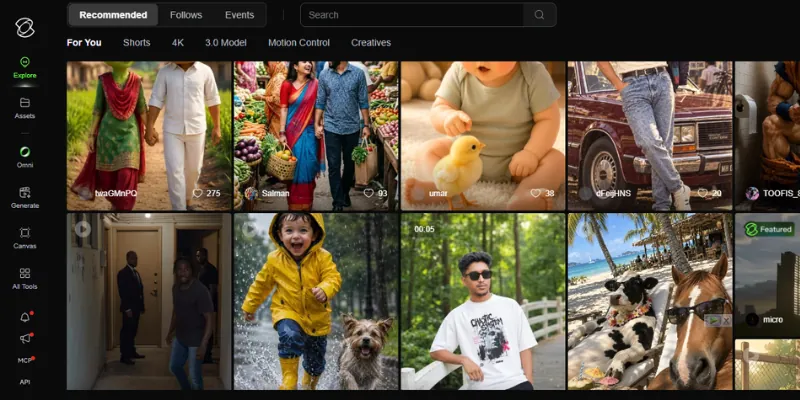
At its core, Kling turns text prompts, images, or a mix of both into short video clips. It also supports native audio generation, so a clip can come out with sound already attached instead of needing a separate step.
Unlike tools that only handle one type of input, Kling works more like a small production studio. You can start from nothing but a text prompt, or you can upload a photo and bring it to life as a moving clip.
Key Features: Kling AI Review
Kling packs a lot into one platform, but three features stand out the most in daily use.
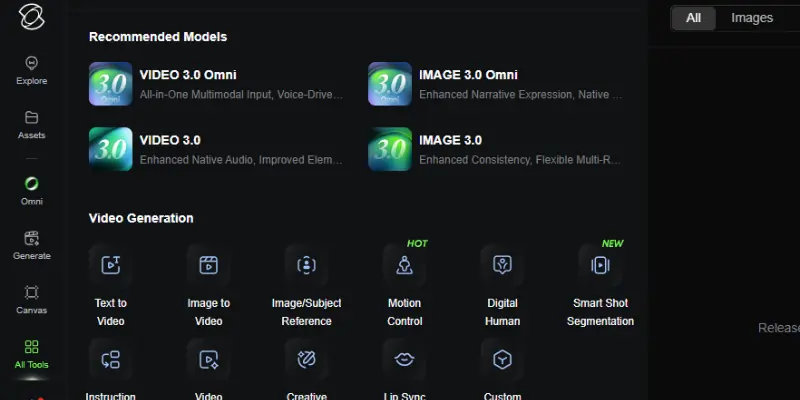
Text-to-Video and Image-to-Video
Text-to-video lets you describe a scene, and Kling builds a clip from scratch. Image-to-video is the feature most creators actually reach for. You upload a still image, a product photo, a portrait, or an AI-generated character, and Kling animates it into a short clip. This matters because you keep control over how the subject looks before any motion gets added, instead of leaving everything to the AI.
Motion Control
Motion Control lets you guide how something moves inside a clip by drawing a rough path or selecting a motion style, rather than only describing it in words. This became especially popular for dance and transformation clips on TikTok and Instagram, where creators wanted specific, repeatable movement rather than whatever the AI decided on its own.
Native Audio Generation
Kling can generate audio alongside video instead of leaving you to add sound in a separate app. It is not a full replacement for proper sound design, but it removes one step from short-form content, especially for creators who just need ambient sound or a simple audio layer to match the scene.
My Experience Using Kling AI
I went in expecting a typical text-to-video tool and came out with a different impression. The image-to-video feature is where Kling genuinely impressed me. I uploaded a plain product photo and a portrait shot, and both came back animated with movement that looked natural rather than jittery. Fabric moved like fabric, and the lighting stayed consistent instead of flickering between frames, which is a common problem with cheaper video generators.
What surprised me more was how often a single generation was not usable on the first try. Some clips came out exactly as I hoped. Others needed two or three attempts before the motion looked right, and each attempt burns credits whether the result is good or not. That is the part reviews rarely mention clearly enough. You are not paying for finished clips. You are paying for attempts, and some of those attempts will fail.
I also tested Motion Control on a simple dance-style clip, and it worked better than I expected for a first try, though it took some trial and error to get the path right. Overall, Kling delivered strong results, but it asked for patience and a bit of a learning curve before those results became consistent.
One thing worth knowing going in: Kling generates raw footage. It does not include a timeline editor, so anything you want stitched together, voiced over, or captioned still needs a separate editing tool afterward.
Kling AI Pricing Plan
Kling AI pricing runs on a subscription plus credit system, which took me longer to understand than it should have. You pick a monthly plan, and that plan gives you a set number of credits. Every generation, depending on resolution, length, and whether audio is turned on, uses a different number of credits.
Here is the general structure as of 2026:
| Plan | Approx. Monthly Price | Best For |
|---|---|---|
| Free | $0 | Testing the platform, casual use, no commercial rights |
| Standard | ~$7/mo | Light, occasional creators |
| Pro | ~$26/mo | Regular content creators |
| Premier | ~$65/mo | Freelancers and small studios |
| Ultra | ~$128/mo | Agencies and high-volume production |
A few honest notes on pricing. First-month rates are often discounted below the regular renewal price, so check what you will actually pay after month one before committing. Credits also do not roll over in full each month, and turning on native audio roughly doubles how many credits a clip costs. If you plan to generate regularly, budget for more credits than the headline plan number suggests, since failed or repeated attempts still count against your balance.
Pricing and credit costs on platforms like this change fairly often, so treat the numbers above as a general guide and check Kling AI’s official pricing page before you subscribe.
Pros and Cons of Kling AI
Here’s a quick, honest breakdown of what stood out in daily use, both the good and the frustrating.
| Pros of Kling AI |
|---|
|
| Cons of Kling AI |
|---|
|
Kling AI vs. Runway
Runway is the more established name in AI video, and it leans harder into being a full production suite rather than just a generator. Where Kling focuses on realistic motion and image-to-video quality, Runway adds green screen removal, motion brush, and a built-in editor on top of its generation engine. If you want to generate and lightly edit inside one app, Runway has the edge. If your priority is realistic human motion at a lower cost, Kling tends to win. You can read our full Runway ML Review for a closer look at how it compares on features and pricing.
Kling AI vs Pika
Pika takes a different approach entirely. It is built around fast, stylized effects rather than photorealism, with features like one-click transformations aimed at quick, attention-grabbing social clips. Kling produces more believable, cinematic motion, but Pika is faster to use for playful, trend-driven content. If your content leans toward viral, effect-heavy clips, Pika may suit you better. If you want footage that looks closer to real film, Kling is the stronger choice.
Kling AI vs Luma AI
Luma AI is built for agencies and creative teams who need production-ready output that fits into an existing pipeline, with strong physics simulation for things like product demos and branded content. Kling competes well on cost and motion realism for individual creators, but Luma tends to edge ahead for teams that need consistent, campaign-ready results across multiple scenes. For solo creators and small budgets, Kling generally offers better value.
Who Should Use Kling AI?
Kling AI fits best if you are a social media creator making Reels, Shorts, or TikTok content, someone turning product photos into video without a camera crew, or a creator experimenting with AI avatars and character-based clips.
It is not the right fit if you need a full editing suite in one place, expect a perfect result on the first generation every time, or you are working on long, multi-scene cinematic projects that need tight continuity.
Final Verdict
Kling AI earns its reputation for realistic motion and strong image-to-video results, and after weeks of testing, I can say the quality holds up even outside a controlled demo. The credit system takes some getting used to, and you will need a separate editor to finish any project, but for the price, few tools match its output quality for human-subject and product video.
If you create short-form content regularly and want believable motion without a steep learning curve, Kling AI is worth trying, starting with the free tier before committing to a paid plan.
FAQs
Here are quick answers to the questions people ask most before trying Kling AI
For creators who need short, realistic video clips without hiring a production team, yes. Whether Kling AI is worth it depends mostly on your use case. If you need quick social content or product visuals, it earns its cost. If you need a complete editing workflow in one app, you will still need to pair it with another tool.
Kling AI uses a subscription plus credit model. Each plan gives you a monthly credit allowance, and every video generation uses credits based on resolution, length, and whether audio is enabled. Failed generations still use credits.
Yes, Kling AI has a free tier that resets daily credits, which is enough for testing and casual use. Commercial use, however, generally requires a paid plan.
Kling AI is mainly used for social media video content, image-to-video animation, product visuals, and motion-based clips like dance or transformation videos.
It depends on what you need. Kling tends to produce more natural human motion at a lower cost, while Runway offers a fuller editing suite alongside generation. Neither is universally better. They serve slightly different workflows.






- Be Respectful
- Stay Relevant
- Stay Positive
- True Feedback
- Encourage Discussion
- Avoid Spamming
- No Fake News
- Don't Copy-Paste
- No Personal Attacks
- Be Respectful
- Stay Relevant
- Stay Positive
- True Feedback
- Encourage Discussion
- Avoid Spamming
- No Fake News
- Don't Copy-Paste
- No Personal Attacks
