Cursor AI vs. GitHub Copilot: Which AI Code Assistant Actually Wins?
Published: 21 Jun 2026
What if your AI coding assistant could save hours of coding time with just a few prompts? That’s why many developers are now comparing Cursor AI vs. GitHub Copilot to find the better AI coding assistant for their workflow.
I tested both tools for debugging, refactoring, and generating boilerplate code. One felt more like an AI pair programmer, while the other worked better for fast, everyday coding assistance.
In this guide, you’ll discover how these AI code editors compare in performance, features, pricing, and developer experience to help you choose the right tool for your needs.
So, let’s dive in and see which one performs better in real-world development workflows.
What Is Cursor AI?
Cursor AI is an AI-powered code editor designed to make software development faster and more efficient. Unlike traditional AI coding tools that serve as simple extensions, Cursor functions as a complete AI-first coding environment with advanced automation and code-understanding features.
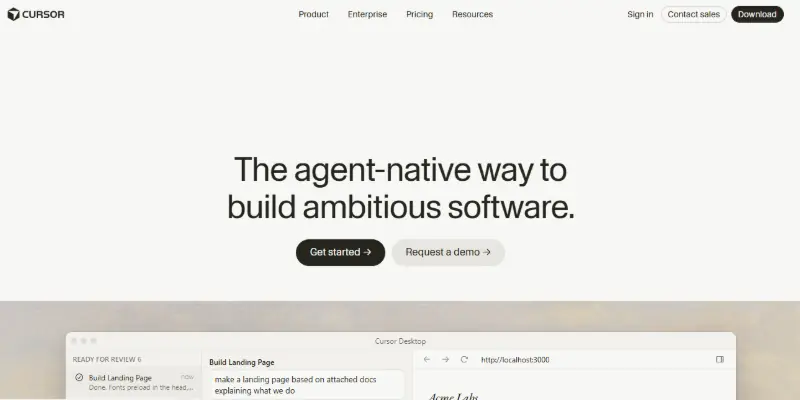
Built on Visual Studio Code, the editor feels familiar while adding powerful AI capabilities like codebase awareness, natural language editing, smart debugging, and multi-file refactoring. After testing it on real projects, Cursor felt more like an AI development partner than a basic autocomplete tool.
Key Features of Cursor AI
- AI-powered coding environment
- Smart codebase understanding
- Natural language editing
- Multi-file code changes
- AI chat assistant
- Advanced refactoring tools
- Intelligent debugging support
- Context-aware code generation
What Is GitHub Copilot?
GitHub Copilot is an AI coding assistant created by GitHub in collaboration with OpenAI to help developers write code faster and more efficiently. Instead of working as a separate editor, Copilot integrates directly into popular IDEs like Visual Studio Code, JetBrains, and Neovim.
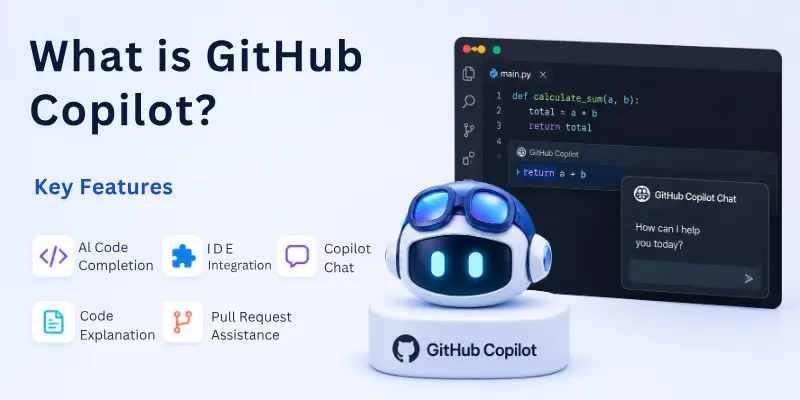
It provides real-time code suggestions, function generation, debugging help, and AI chat support while you code. During testing, Copilot felt smooth and beginner-friendly, especially for speeding up repetitive coding tasks and improving daily development workflows.
Key Features of GitHub Copilot
- AI code completion
- IDE integration
- Copilot Chat
- Code explanation tools
- Pull request assistance
- CLI support
- Documentation generation
- Multi-language support
Cursor AI vs GitHub Copilot: Detailed Comparison
Cursor AI and GitHub Copilot both improve coding productivity, but they work differently in real development environments. One focuses more on advanced AI-powered workflows, while the other keeps things simple and beginner-friendly.
Here are the main differences between them.
- User Interface and Developer Experience
- Code Completion Accuracy
- Context Awareness and Codebase Understanding
- AI Chat and Agent Features
- Multi-File Editing and Refactoring
- IDE Compatibility
- Performance and Speed
- Pricing Comparison
Let’s compare them in detail.
1. User Interface and Developer Experience
The overall coding experience feels quite different on both platforms.
Cursor AI
Cursor AI is designed as a complete AI-first code editor. The interface feels modern and heavily focused on automation, smart editing, and AI-assisted workflows. Developers can interact with their projects using natural language prompts and manage larger coding tasks more efficiently.
At first, the editor may feel slightly advanced because of its AI-focused features. However, after spending some time with it, the workflow becomes smooth and highly productive.
GitHub Copilot
GitHub Copilot feels much simpler because it works directly inside familiar IDEs like Visual Studio Code and JetBrains. There is almost no setup process, and developers can start generating code suggestions immediately.
The experience feels lightweight and beginner-friendly, especially for developers who do not want to switch editors or change their workflow. Ideal for users who prefer a simple AI coding assistant.
2. Code Completion Accuracy
Accurate code suggestions can save a huge amount of development time.
Cursor AI
Cursor AI provides context-aware code generation by understanding larger sections of the project. During testing, its suggestions often felt smarter in larger applications and complex coding environments.
It performs especially well when handling structured projects with connected files and reusable components. A strong option for developers working on advanced applications.
GitHub Copilot
GitHub Copilot is excellent for fast inline code suggestions, repetitive coding patterns, and boilerplate generation. It responds quickly and works smoothly for everyday programming tasks.
The tool performs very well for smaller projects, scripting, and quick development workflows. Perfect for fast and efficient coding assistance.
3. Context Awareness and Codebase Understanding
This is one of the biggest differences between these AI coding tools.
Cursor AI
Cursor AI can understand entire codebases more effectively. Developers can ask it to refactor functions, update APIs, or analyze project structures across multiple files. This deeper understanding helps maintain consistency during large-scale code changes.
Excellent for SaaS projects, enterprise applications, and complex development environments.
GitHub Copilot
GitHub Copilot mainly focuses on the currently active file and the nearby context. While its workspace awareness has improved, it still does not analyze projects as deeply as Cursor AI. It works best for quick coding assistance rather than full project-level management.
Suitable for developers who mainly need smart autocomplete features.
4. AI Chat and Agent Features
Both platforms include AI chat tools, but their workflows feel very different.
Cursor AI
Cursor AI includes advanced AI agent workflows that can perform larger development tasks with minimal instructions. Instead of generating single code snippets, it can plan edits, modify files, and automate coding processes.
This creates a more advanced AI development experience. Helpful for developers managing larger coding tasks.
GitHub Copilot
GitHub Copilot Chat focuses more on answering coding questions, explaining errors, and generating examples directly inside the IDE.
The workflow feels simpler and easier to control during everyday coding sessions. A good choice for quick problem-solving and productivity.
5. Multi-File Editing and Refactoring
Handling multiple files efficiently is important in large projects.
Cursor AI
Cursor AI performs very well during multi-file editing and code refactoring tasks. Developers can update connected files, rename functions, and modify project structures much faster.
This makes it highly useful for large-scale application development. Great for developers working on complex software projects.
GitHub Copilot
GitHub Copilot mainly focuses on the active coding window instead of handling entire project structures. While it still helps with coding efficiency, its refactoring capabilities are more limited compared to Cursor AI. Better suited for smaller coding tasks and quick edits.
6. IDE Compatibility
The setup experience differs significantly between the two tools.
Cursor AI
Cursor AI works as a standalone AI code editor based on Visual Studio Code. Developers may need to move extensions, themes, and settings during setup. Once configured, the workflow feels highly optimized for AI-assisted coding.
GitHub Copilot
GitHub Copilot supports multiple IDEs, including:
- Visual Studio Code
- JetBrains IDEs
- Neovim
- Visual Studio
This flexibility makes it easier for developers and teams to use different coding environments.
7. Performance and Speed
Performance can directly affect daily productivity.
Cursor AI
Cursor AI processes larger amounts of project context, which can sometimes make responses slightly slower. However, the output quality often feels more detailed and intelligent.
The tool performs especially well on modern systems and larger development projects.
GitHub Copilot
GitHub Copilot feels faster during inline code completion and small development tasks. Suggestions appear quickly, making the coding experience smooth and responsive. Excellent for fast-paced development workflows.
Cursor AI vs GitHub Copilot: Comparison Table
Here is a clear side-by-side comparison to help you quickly understand how both AI coding assistants differ in real-world development use.
| Feature | Cursor AI | GitHub Copilot |
|---|---|---|
| Core Type | AI Code Editor | IDE AI Assistant |
| Setup | Requires switching editors | Plug-and-play extension |
| Project Understanding | Deep full-codebase context | Limited file-based context |
| Coding Speed | Smart but slightly heavier | Very fast suggestions |
| Multi-file Editing | Advanced automation | Basic support |
| AI Chat | Powerful agent-style chat | Standard chat assistant |
| Learning Curve | Medium | Easy |
| Pricing | Higher ($20+) | Lower ($10+) |
| Best Use Case | Large-scale development | Daily coding & quick tasks |
Cursor AI vs GitHub Copilot for Different Developers
Different developers have different needs, so the right choice depends on experience level and project type. Here’s a quick breakdown of which tool fits best in real-world use.
- Best for Beginners: GitHub Copilot is better for beginners because it works inside familiar IDEs and is easy to start using. It gives fast suggestions without changing your workflow, making it ideal for learning and daily practice.
- Best for Professional Developers: Cursor AI suits professional developers who work on large or complex projects. It offers deeper codebase understanding and better support for multi-file editing and advanced AI workflows.
- Best for Freelancers: Freelancers can benefit from Cursor AI for faster development and refactoring in client projects. However, GitHub Copilot is still a good low-cost option for smaller tasks and quick coding work.
- Best for Teams and Enterprises: Cursor AI is useful for teams handling large codebases with complex logic. On the other hand, GitHub Copilot is preferred in teams already using GitHub because it integrates smoothly into existing workflows.
Developer Community Opinions
Many developers on Reddit and developer forums believe Cursor AI is more powerful for serious engineering workflows. Users frequently praise its ability to understand project structure and automate repetitive development tasks.
GitHub Copilot remains highly popular because of its simplicity, reliability, and seamless integration with existing workflows.
Interestingly, many professional developers use both tools together. They rely on Copilot for fast inline suggestions and Cursor for larger AI-assisted workflows.
Cursor AI vs GitHub Copilot: Pricing Plans
Pricing is one of the biggest factors when choosing between AI coding tools because both Cursor AI and GitHub Copilot now follow a mix of subscription and usage-based systems.
Here is a clear breakdown of both tools and what you actually get for the price.
Cursor AI Pricing Plans
Cursor AI Pricing offers a tiered model designed for individuals, professionals, and teams. The pricing structure is mainly built around monthly subscriptions with usage credits for advanced AI features.
- Hobby Plan: $0 per month
- Pro Plan: Around $20 per month
- Business Plan: Around $40 per user per month
GitHub Copilot Pricing Plans
GitHub Copilot follows a simpler subscription model but is also moving toward usage-based AI credits for advanced features.
- Copilot Free: $0
- Copilot Pro: Around $10 per month
- Copilot Pro+: Around $39 per month
Best Alternatives to Cursor AI and GitHub Copilot
If you want to explore beyond Cursor AI and GitHub Copilot, there are several other AI coding tools worth considering. Each one focuses on different strengths like speed, simplicity, or advanced AI assistance.
- Codeium: A free AI coding assistant with fast autocomplete and wide IDE support
- Tabnine: Focuses on privacy-first AI code completion for developers and teams
- Replit Ghostwriter: Built into Replit for browser-based coding and quick project setup
- Windsurf: An AI-powered coding environment designed for modern development workflows
- Claude Code: Strong at reasoning-based coding, helping, debugging, and complex problem-solving
Each tool fits different developer needs, so the best choice depends on whether you prioritize speed, advanced AI features, or simple integration into your existing workflow.
Cursor AI vs GitHub Copilot: Pros and Cons
Here’s a balanced breakdown of what each tool does well and where they fall short, based on real-world development usage and workflow differences.
Cursor AI Pros and Cons
Pros
- Strong understanding of entire codebases
- Advanced AI-driven editing and automation
- Excellent support for refactoring and large changes
- Ideal for complex and large-scale projects
Cons
- Higher pricing compared to alternatives
- Requires switching to a new editor
- Can use more system resources
GitHub Copilot Pros and Cons
Pros
- Very easy to set up and start using
- Works inside popular IDEs like VS Code and JetBrains
- More budget-friendly pricing
- Fast and smooth code autocomplete
Cons
- Limited deep project-level understanding
- Less advanced multi-file editing
- Fewer autonomous AI workflows compared to Cursor AI
The Final Winner: Cursor AI or GitHub Copilot?
Both Cursor AI and GitHub Copilot are powerful AI coding assistants, but they are built for different types of developers and workflows. Cursor AI focuses on deep codebase understanding, advanced automation, and multi-file editing, making it more suitable for complex and large-scale development. GitHub Copilot, on the other hand, keeps things simple, fast, and beginner-friendly by working directly inside popular IDEs.
So, is there a clear winner? It really depends on how you code. If your goal is advanced AI-driven development and handling bigger projects with smarter context awareness, Cursor AI takes the lead. But if you want a lightweight, affordable, and easy-to-use assistant for everyday coding tasks, GitHub Copilot is the better choice.
In simple terms, Cursor AI wins for power and depth, while GitHub Copilot wins for simplicity and accessibility.
Conclusion
In this guide, you explored a detailed comparison of Cursor AI vs. GitHub Copilot, including features, performance, pricing, real-world use cases, and developer experience. Both tools are powerful in their own way, but they are designed for different types of users and coding styles.
If you want power, depth, and advanced AI workflows, Cursor AI is the stronger option. If you prefer ease of use, affordability, and quick coding assistance, GitHub Copilot is the better fit. Ultimately, the best tool depends on your workflow, project size, and personal coding style.
Don’t miss the FAQs section below to clear any remaining doubts and make the right choice for your development procedure.
FAQs
Here are some common questions developers ask when choosing between Cursor AI and GitHub Copilot.
Cursor AI is generally more effective for large and complex codebases because it understands project structure more deeply. It can work across multiple files and maintain better context while making changes. This makes it more suitable for scalable applications and enterprise-level development.
GitHub Copilot is known for its fast AI code completion, especially during everyday coding tasks. It provides instant inline suggestions without slowing down the workflow. This makes it ideal for developers who prioritize speed and simplicity.
Yes, Cursor AI is designed for advanced multi-file editing and intelligent refactoring. It can update connected files simultaneously while maintaining code consistency. This feature is especially useful in large software projects.
- Updates multiple files at once
- Maintains project-wide consistency
GitHub Copilot is a strong choice for beginners because it integrates easily into familiar IDEs. It helps new developers learn faster by suggesting real-time code examples. It reduces the learning curve significantly for coding practice.
GitHub Copilot is better optimized for VS Code users since it works as a native extension. It blends smoothly into the existing workflow without requiring any editor switch. This makes it a practical choice for daily development.
Cursor AI provides more advanced AI agent capabilities compared to GitHub Copilot. It can plan, modify, and execute multi-step coding tasks with deeper context awareness. This makes it closer to an AI-powered development assistant.
- Supports task automation workflows
- Handles complex coding instructions
GitHub Copilot is generally more cost-effective, especially for individual developers and students. It offers essential AI coding features at a lower subscription price. Cursor AI, while more powerful, is priced higher due to its advanced capabilities.
AI coding tools like Cursor AI and GitHub Copilot improve productivity but cannot replace developers. They assist in content writing, debugging, and optimizing code, but still require human decision-making. Developers remain essential for architecture, logic, and system design.





- Be Respectful
- Stay Relevant
- Stay Positive
- True Feedback
- Encourage Discussion
- Avoid Spamming
- No Fake News
- Don't Copy-Paste
- No Personal Attacks
- Be Respectful
- Stay Relevant
- Stay Positive
- True Feedback
- Encourage Discussion
- Avoid Spamming
- No Fake News
- Don't Copy-Paste
- No Personal Attacks
