How to Build a Website Using AI: A Complete Step-by-Step Guide
Published: 14 Jul 2026
A few years ago, building a website meant hiring a developer, paying a designer, and waiting weeks for a finished product. That is no longer the case. How to build a website using AI is one of the most searched questions right now, and for good reason. AI website builders can now generate a full layout, write your copy, and even suggest SEO structure, all from a simple text prompt.
Whether you are launching a portfolio, a small business site, or an online store, this guide walks you through the entire process, the tools worth trying, and the mistakes to avoid along the way.
What Is an AI Website Builder?
An AI website builder is a platform that uses machine learning to create a working website based on your description, instead of asking you to drag and drop every section manually. You type in a few details about your business or idea, and the AI generates a layout, writes placeholder content, picks a color scheme, and structures the pages for you.
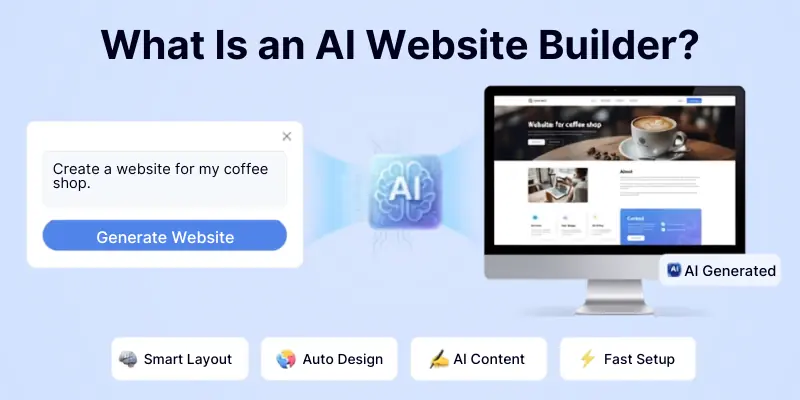
This is different from a traditional builder like classic WordPress or Wix, where you start from a blank template and build everything section by section. With AI, the heavy lifting happens in the first few seconds, and you spend your time refining rather than starting from zero.
Why Use AI to Build a Website
There are a few clear reasons people are switching to AI-powered website creation:
- Speed: A basic site that used to take weeks can now be ready in under an hour.
- No coding required: You do not need to know HTML, CSS, or JavaScript to get a working site online.
- Built-in content generation: Many tools write your homepage copy, about page, and even product descriptions for you.
- Lower cost: You skip the cost of hiring a developer or designer for a basic build.
- Consistency: AI keeps fonts, spacing, and colors uniform across every page automatically.
Of course, AI is not perfect. It can still misjudge details or generate generic-sounding text, which is why the review and editing step later in this guide matters so much.
Step-by-Step: How to Build a Website Using AI
Here is the actual process, broken down into steps you can follow regardless of which builder you choose.
Step 1: Define Your Website’s Purpose
Before opening any tool, get clear on why you are building the site. Are you selling a product, showcasing your work, or building an information site? This decision shapes everything that comes after it, from the pages you need to the tone of the content.
Step 2: Research Your Competitors
Look at two or three websites in your niche. Note their page structure, what sections they include, and what feels missing. This is a step most beginners skip, but it saves you from rebuilding your site later once you realize a competitor is doing something better.
Step 3: Choose the Right AI Website Builder
Not every tool fits every use case. Some are better for e-commerce, others for portfolios, and others for full-stack apps with backend functionality. If you’re building a store, it’s worth pairing the site with the right AI tools for dropshipping for product research, and if the goal is generating inquiries instead of direct sales, a look through AI tools for lead generation will help you plan the site’s forms and CTAs accordingly. Pick a builder based on your specific goal rather than whichever one is trending.
Step 4: Write a Detailed Prompt
This step matters more than people expect. A vague prompt like “bakery website” gives you a generic result. A prompt like “an artisan bakery in Lahore specializing in custom wedding cakes, warm and cozy tone, with an online ordering page” gives the AI enough detail to generate something usable on the first try.
For example, if you own a bakery in the United States, you could enter a prompt like:
“Create a modern bakery website with online ordering, product gallery, testimonials, and contact page.”
Most AI builders will take that single line and generate a homepage with a warm, food-themed hero image, a menu or product gallery section pulling in cake and pastry categories, a testimonials block with sample customer quotes you can later replace with real reviews, an order form or “Order Now” button linked to a checkout page, and a contact section with your address and hours. You still need to swap the placeholder photos for your own, rewrite the testimonials with real customer feedback, and update the menu with your actual prices, but the entire skeleton of the site is already there within seconds of submitting the prompt.
Step 5: Review the Generated Layout
Once the AI builds your first draft, look at the overall structure before worrying about small details. Check whether the sections make sense for your business and whether anything important is missing, like a contact page or pricing section.
Step 6: Customize Content and Design
Replace the AI-written placeholder text with your own voice. Swap stock images for real photos if you have them, or if you need extra visuals the builder didn’t generate, something like AI tools for graphic design can fill the gap without hiring a designer. Adjust the color palette to match your brand. This is where the site stops looking like a template and starts looking like yours.
Step 7: Add On-Page SEO Elements
Add proper meta titles, meta descriptions, alt text for images, and clean URLs. Many AI builders include basic SEO optimization tools, but you should still double-check that your target keyword appears naturally in your headings and first paragraph.
Step 8: Test Before You Publish
Click every link, check the mobile view, and make sure your forms actually submit. AI-generated sites usually work well out of the box, but a manual check catches the small errors that automated tools miss.
Step 9: Connect Your Domain and Publish
Once everything looks right, connect your custom domain and publish. Most AI builders handle hosting automatically, so this is usually the fastest part of the whole process. From here, the real work shifts to getting people to actually visit the site, whether that means running ads, building an email list, or working through the ideas in our AI tools for digital marketing guide.
Best AI Website Builders to Try
A few tools consistently come up as strong options depending on what you need. Here’s a quick comparison before we go into detail on each one:
| Builder | Best For | Coding Needed | Starting Price |
|---|---|---|---|
| Squarespace Blueprint AI | Polished, designer-quality sites | No | Paid plan required to publish |
| GoDaddy Airo | Small business owners, simple setup | No | Free to build, paid to publish |
| Figma Make | Designers who want more control | No | Free tier available |
| Durable | Fastest build, under a minute | No | Free to build, paid to publish |
| Base44 | Full-stack sites with backend features | No | Free tier available |
Why Choose Squarespace Blueprint AI?
Squarespace’s Blueprint AI Builder asks you a short series of guided questions about your business and design preferences, then generates a full draft including page structure, written copy, and images in one pass. What sets it apart from most competitors is that it’s built on top of Squarespace’s own design system, refined over roughly two decades, so the output rarely looks like a generic template.
It also comes with built-in SEO tools, including editable meta descriptions and clean URL structures, which is useful if ranking on Google matters to you from day one. The tradeoff is that customization happens within Squarespace’s ecosystem, so if you want a highly unconventional layout, you may find it a little more restrictive than a tool like Figma Make.
It’s best suited for small business owners and creatives who want a professional result without touching a single design decision themselves.
Why Choose GoDaddy Airo?
GoDaddy’s Airo AI Builder is built around simplicity. You describe your business and goals in plain language, and Airo generates a working site with a suggested layout, written content, and a matching color palette. It leans heavily on automation, choosing fonts and design elements for you based on your industry, which makes it a strong fit for small business owners who don’t want to spend time on design decisions at all.
Airo also includes basic marketing tools bundled in, like social media post suggestions and a domain name generator, so you’re not just getting a website but a small starter kit for your online presence. The main limitation is that deep customization is more limited compared to design-first tools, so if your brand needs a very specific look and feel, you may eventually outgrow it. For a first website built quickly and affordably, though, it’s one of the easiest entry points available.
Why Choose Figma Make?
Figma Make is the better choice if you or your team already works inside Figma, since it turns a text prompt into a fully editable design directly on your existing canvas. Instead of generating a locked template, it produces layouts, sections, and even AI-assisted copy that you can adjust with the same precision as a hand-built Figma file, including colors, typography, and spacing down to the pixel.
This makes it especially useful for freelancers and small agencies who need to hand off a polished, on-brand design to a developer or client afterward. The tradeoff is that Figma Make assumes some familiarity with the Figma interface, so it has a slightly steeper learning curve than fully automated builders like Durable. If design control matters more to you than raw speed, this is the strongest option on the list.
Why Choose Durable?
Durable is built entirely around speed, generating a complete website, including content, images, and a suggested design, in about 30 seconds after you answer a few basic questions. Beyond the initial build, it bundles in tools that go past just the website itself, such as a built-in CRM, invoicing, and lead capture forms and chatbots, which makes it a reasonable all-in-one option for a solo business owner who doesn’t want to juggle five separate platforms.
The drag-and-drop editor afterward is straightforward enough that non-technical users can make real-time changes without much of a learning curve. Where it falls a little short is depth of customization, because everything is optimized for speed, some users find the design options more limited than a tool like Figma Make. For anyone who wants a functional site online today rather than next week, Durable is hard to beat.
Why Choose Base44?
Base44 goes further than most AI website builders by generating a full-stack, hosted website from a single prompt, handling the backend, database, and authentication automatically instead of producing just a front-end layout. You describe what you want to build in natural language, and the AI creates a live, working site you can refine entirely through conversation rather than manually editing files.
This makes it a strong fit for anyone who needs actual functionality on their site, like user accounts, bookings, or stored data, not just a static page with a contact form. It also gives you the freedom to move things around after the initial build rather than locking you into the first result. The tradeoff is that it’s overkill if all you need is a simple brochure-style site, in which case a lighter tool like Durable or Airo will get you there faster.
Whichever builder you pick, the copy it generates will still need a human pass. Running your drafts through an AI content-writing tool can help you tighten the tone before anything goes live.
Common Mistakes to Avoid
Skipping the editing step: AI-written copy is a starting point, not a finished product. Always rewrite sections so they sound like an actual person, not a template.
Ignoring mobile design: Most AI builders are responsive by default, but always check how your site looks on a phone before publishing.
Overloading the homepage: AI tools sometimes generate more sections than you need. Keep only what genuinely helps a visitor understand your business.
Forgetting to add real images: Stock photos from an AI builder can look generic. If you run a business, real photos build more trust than placeholder visuals, and where real photos aren’t possible, our list of AI tools for image generation covers options that look far less templated. If your site includes video or voice content, our guide to AI audio tools is worth checking too.
Publishing without SEO basics: A beautiful site with no meta description or keyword structure will struggle to get found on Google.
Pros and Cons of Building a Website with AI
Pros
- Fast website creation, often a working draft within minutes
- No coding required, so beginners can build a real site on their own
- Lower cost compared to hiring a developer or designer
- Built-in content generation for homepage copy, about pages, and product descriptions
Cons
- Designs can look generic if you skip the customization step
- SEO still needs manual work, since AI rarely gets keyword placement fully right on its own
- Some platforms offer limited customization once you want to go beyond the standard template
Final Thoughts
If you’re wondering how to build a website using AI, today’s tools make the process faster and easier than ever. With the right AI website builder and a few hours of customization, you can launch a professional website without coding skills. It is no longer a shortcut for people who cannot afford a developer, it has become the standard starting point for anyone launching a new site quickly.
The tools handle the layout and the first draft of content, but the editing, the SEO, and the personal touch still come from you. If the site is part of a bigger income plan, it’s worth reading our guide to AI tools for affiliate marketing once your build is live. Get the balance right, and an AI-built site can look just as professional as one built the traditional way, in a fraction of the time.
Frequently Asked Questions
Here are some frequantly asked quaestions about how to build website using AI.
No. These tools are built specifically so people without technical backgrounds can create a working site through prompts and simple editing.
Yes, nearly all major AI website builders let you connect an existing domain or purchase one directly through the platform.
It can be, as long as you edit it for accuracy and add your own keyword research rather than publishing the first draft as is. Search engines reward genuinely useful content regardless of how it was written.
Tools like Durable and GoDaddy’s Airo are generally the easiest to start with since they ask a few simple questions and generate a complete draft immediately.
Most tools generate a working first draft in a few minutes. The full process, from writing your prompt to customizing content and publishing, usually takes a few hours rather than the weeks a traditional build would need.
Not directly on its own, since ChatGPT doesn’t host or publish pages. It can write your website copy, generate a suggested page structure, and even produce basic HTML and CSS code that a developer or no-code tool can use, but you would still need a hosting platform or website builder to turn that output into a live site.
It depends on the goal. An AI website builder is faster and easier for a simple site with no coding involved, while WordPress offers more long-term flexibility, plugins, and control once a site grows beyond a basic build. Many small businesses start with an AI builder and move to WordPress later as their needs get more complex.
Yes. Several AI website builders, including Base44 and Durable, can generate a working online store with product pages, a cart, and checkout functionality from a single prompt. You’ll still want to double-check payment integration and shipping settings manually before launch.
AI builders can misjudge context, generate generic-sounding text, and sometimes limit how far you can customize a layout once you move past the standard template. They also don’t replace human judgment on tone, brand voice, or the fine details that make a site feel truly yours, which is why a manual review before publishing still matters.






- Be Respectful
- Stay Relevant
- Stay Positive
- True Feedback
- Encourage Discussion
- Avoid Spamming
- No Fake News
- Don't Copy-Paste
- No Personal Attacks
- Be Respectful
- Stay Relevant
- Stay Positive
- True Feedback
- Encourage Discussion
- Avoid Spamming
- No Fake News
- Don't Copy-Paste
- No Personal Attacks
