ChatGPT vs Claude AI: Which AI Chatbot Is Actually Better in 2026?
Published: 2 Jun 2026
When I first started using AI tools for my content work, I honestly had no idea which one to trust. I opened ChatGPT, typed a few prompts, and thought, Okay, this is impressive. Then a friend told me to try Claude. And after a few days of using both side by side, I realized they are not the same tool, with different logos.
They think differently. They write differently. And depending on what you need, one will serve you a lot better than the other.
In this comparison of ChatGPT vs. Claude AI, I will walk you through everything from writing quality to pricing to real use case examples so you can stop guessing and start using the right tool for your work.
What is ChatGPT?
ChatGPT is an AI chatbot created by OpenAI and launched in November 2022. It became the fastest-growing consumer app in history and essentially introduced millions of people to the idea of talking to an AI assistant.
Today, ChatGPT offers advanced AI models for both free and paid users, along with features like web browsing, file uploads, image generation, and voice interactions. It does a lot more than just answer questions. You can generate images with DALL-E 3, have voice conversations, upload files, browse the web, use pre-built custom GPTs, and even run code directly inside the platform.
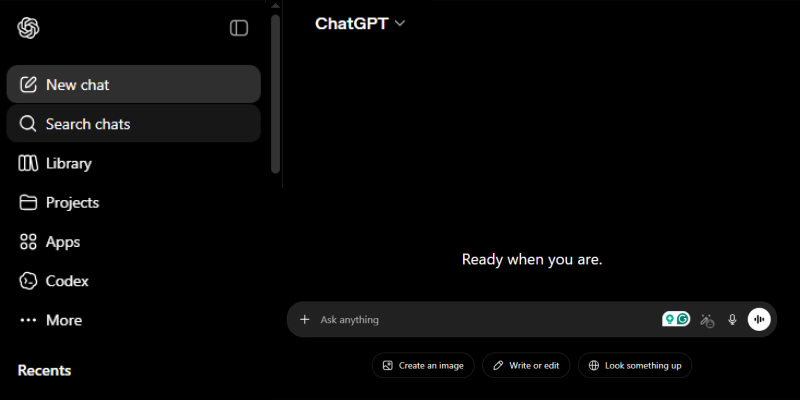
For most people, ChatGPT is their first AI tool, and it is easy to see why. The interface is clean, the responses are fast, and it handles almost anything you throw at it.
Key Highlights:
- Developed by OpenAI
- Supports image generation, voice, web browsing, and plugins
- Custom GPTs for specialized tasks
- Best for: all-in-one AI users, marketers, casual users
What is Claude AI?
Claude is an AI assistant developed by Anthropic, a company founded in 2021 by researchers who previously worked at OpenAI. Claude was built from the ground up with a strong emphasis on safety, accuracy, and natural communication.
What makes Claude different from the very beginning is something called Constitutional AI. This is a training method where the model learns to follow a defined set of ethical guidelines, drawn from sources like the United Nations Declaration of Human Rights. In simple terms, Claude is designed to be helpful without causing harm, and it tends to be more careful about what it says and how it says it.
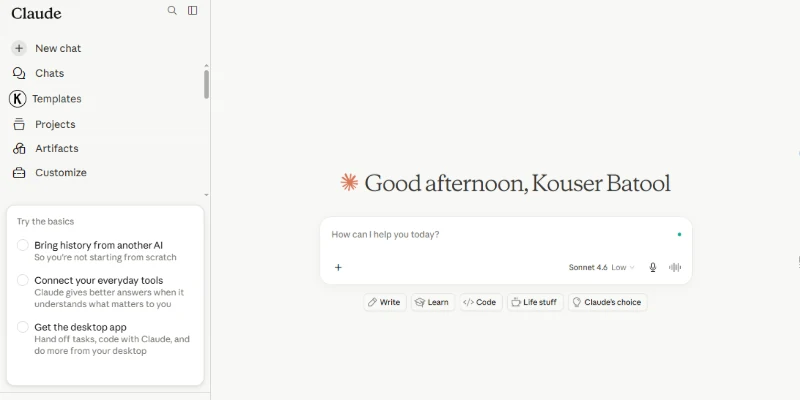
Claude’s current lineup includes Claude Haiku (fast and lightweight), Claude Sonnet (balanced for everyday tasks), and Claude Opus (most powerful, used for complex writing and coding). The latest flagship is Claude Opus 4.8.
Key Highlights:
- Developed by Anthropic
- Built on Constitutional AI for safety and accuracy
- Very strong for writing, long documents, and coding
- Best for: writers, developers, researchers, privacy-conscious users
Quick Comparison: ChatGPT vs Claude AI
Before going deep into individual features, here is a side-by-side overview to help you understand where each tool stands.
| Featured | ChatGPT | Claude AI |
|---|---|---|
| Developer | OpenAI | Anthropic |
| Top Model | GPT-5.4 | Claude Opus 4.8 |
| Context Window | Up to 128K tokens | Up to 200K tokens |
| Image Generation | Yes (DALL-E 3) | No |
| Web Browsing | Yes | Yes |
| Voice Mode | Yes | No |
| Free Plan | Yes | Yes |
| Paid Plan | $20/month | $20/month |
| Best For | Multimodal, all-in-one use | Writing, coding, and long documents |
At a glance, ChatGPT offers more features. Claude focuses its energy on fewer things but does them better.
ChatGPT vs Claude: Core Differences Explained
Both tools handle everyday tasks well, but the real differences show up when you push them on specific things. Here is what I actually noticed after testing both side by side across writing, coding, research, and privacy.
1. Writing and Content Quality
This is the area I personally notice most in my day-to-day work as a content writer. When I ask both tools to write the same blog intro, the results are noticeably different.
ChatGPT does have an advantage when it comes to structure and consistency. It tends to follow prompts closely and produces organized drafts that are easy to edit, especially for informational or SEO-focused content.
Claude writes differently. The sentences vary more. The tone shifts naturally. It does not sound like it came out of a template.
Real Example:
I asked both tools to write an intro for an article about productivity apps.
ChatGPT wrote, “In today’s fast-paced world, staying productive has never been more important. With so many distractions around us, finding the right tools can make all the difference.”
Claude wrote: “Most productivity apps promise to fix your workflow. Few of them survive the first week. Here is what I actually found useful after testing dozens of them.”
The second one feels like a person wrote it. That difference matters when you are publishing content that needs to connect with readers.
Winner for writing: Claude AI
2. Coding and Development
If you write code or work with developers, this is one of the most important comparisons.
Claude has pulled ahead significantly in coding tasks. Many developers now prefer Claude for advanced coding workflows because of its strong reasoning and code analysis capabilities. Cursor IDE integrates Claude models and is widely used by developers for AI-assisted coding workflows. Claude is especially good at understanding complex bugs, working across multiple files, and making architectural decisions where careful reasoning matters.
Claude Pro also includes Claude Code, a terminal-based agent that reads your codebase, edits files, runs commands, and interacts with your local Git. It runs on your machine and never sends your code to a cloud container. For developers, this is a massive advantage.
Real Example:
I tested both tools with a JavaScript bug involving async functions and state management. ChatGPT gave a correct fix but explained it generically. Claude identified the root cause of the issue, explained why it was happening, and suggested a cleaner approach for the entire function, not just the broken line.
Independent coding benchmarks often place Claude among the top-performing models for software engineering tasks, particularly on complex debugging and reasoning challenges.
Winner for coding: Claude AI
3. Context Window and Long Documents
The context window is basically how much text an AI can read and remember in one session. This matters a lot when you are working with long documents, research papers, or large projects.
Claude’s context window goes up to 200,000 tokens on standard plans, which is roughly equivalent to a 500-page book. Anthropic has even released a research-level model with a 1-million-token context. ChatGPT’s context window tops out at 128,000 tokens on Plus plans.
Real Example:
I uploaded a 90-page market research report to both tools and asked them to summarize the three most important findings for a specific target audience. Claude returned a focused, well-organized summary that correctly referenced details from different sections of the document. ChatGPT’s response was shorter and missed some key points from the latter half of the report.
Winner for long documents: Claude AI
4. Image Generation
This one is straightforward. ChatGPT has built-in image generation powered by DALL-E 3. You can type a description and get an image back within seconds, all inside the same platform.
Claude does not generate images at all right now. If you need visuals, you have to use a separate tool like Adobe Firefly, Midjourney or DALL-E through another interface.
Real Example:
For a client’s social media post, I typed “a minimalist illustration of a person using a laptop in a coffee shop, warm tones, flat design style” into ChatGPT. It returned four image options I could choose from without leaving the app. With Claude, I would have had to go somewhere else entirely.
Winner for image generation: ChatGPT
5. Web Search and Real-Time Information
Both tools can browse the web in 2026, which means neither is stuck with just its training data. You can ask about current events, recent product launches, live pricing, or anything that changes frequently.
ChatGPT’s browsing integration feels slightly more reliable for pulling information from multiple sources and presenting it clearly. Claude’s web search has improved a lot and handles most research tasks well.
Real Example:
I asked both tools, “What are the latest pricing changes for Canva Pro in 2026?”
ChatGPT pulled results from multiple sources, listed the updated pricing clearly, and cited where it found the information. The response felt organized and easy to scan.
Claude also returned the correct information but presented it in a more paragraph-heavy format. Accurate, but slightly harder to skim when you just need a fast answer.
For most users, the difference here is minor. Both tools will give you current information. ChatGPT’s PowerPoint presentation of cited sources tends to be a bit cleaner.
Winner: Slight edge to ChatGPT
6. Privacy and Data Security
This one matters more than most people realize, especially if you use AI tools for client work or handle any sensitive information.
Claude provides stronger privacy protections by default. Even on standard plans, Anthropic takes a conservative approach to how your conversations are handled. ChatGPT’s privacy settings and data usage policies can vary by platform and plan, so it is always worth reviewing the latest privacy controls before sharing sensitive information.
Real Example:
A freelance content writer shared a confidential client brief with both tools to generate a strategy draft. With ChatGPT on the free plan, that conversation data could potentially be used for training unless she went into Settings, found the Data Controls section, and turned off the option manually. Most users never do this because they do not know it exists.
With Claude, that same conversation is handled with more conservative defaults from the start, without requiring any extra steps.
If you are writing confidential reports, working with proprietary data, or handling client information, Claude’s defaults offer more peace of mind without needing to upgrade to an enterprise plan.
Winner for privacy: Claude AI
7. Accuracy and Hallucinations
Both AI models can and do make things up sometimes. This is called hallucination, and it is still a real limitation of all large language models in 2026.
However, Claude tends to be more honest about uncertainty. Rather than confidently stating something incorrect, it is more likely to say it is not sure or to flag a response as unverified. For content that involves statistics, facts, or technical claims, this behavior is more trustworthy.
Real Example:
I asked both tools, “What is the monthly active user count for Notion as of 2025?”
In some cases, ChatGPT may present statistics confidently even when they are not verified. It sounded like a real statistic, but it was not.
Claude responded differently. It said something like, “I don’t have a verified recent figure for this. The last publicly reported number was around 30 million users, but I’d recommend checking their official newsroom for an updated figure.” That response was less satisfying in the moment but far more trustworthy.
For a content writer, publishing a wrong statistic because your AI tool said it confidently is a real risk. Claude’s habit of flagging uncertainty saves you from that.
Winner for accuracy: Claude AI (slight edge)
Pricing Comparison: Claude AI vs ChatGPT
Both platforms offer a free tier and a paid plan at the same price.
| Plan | ChatGPT | Claude AI |
|---|---|---|
| Free | GPT-4o with usage limits | Claude Sonnet with usage limits |
| Paid | $20/month (Plus) | $20/month (Pro) |
| What you get | GPT-5 access, image generation, voice, plugins | Claude Opus access, Claude Code |
| API pricing | Higher per million tokens | Claude Sonnet around $3 per million tokens |
For developers building on the API, Claude Sonnet is significantly more affordable. If you are running a content pipeline or a product that makes frequent API calls, the cost difference over a month can be substantial.
For casual users, both free plans are genuinely useful for everyday tasks.
Real-World Use Case Examples
Here are four common scenarios, ChatGPT vs. Claude AI, to show exactly which tool works better in practice.
Scenario 1: You are a blogger writing two articles per week. Claude is the better choice. The writing feels more natural, requires fewer edits, and holds a consistent tone throughout longer pieces.
Scenario 2: You are a developer working on a React project. Claude is the better choice. Claude Code reads your actual files, understands context across the entire codebase, and handles multi-file changes in a way ChatGPT’s chat interface cannot match.
Scenario 3: You are a social media manager who needs post copy and visuals. ChatGPT is the better choice. You can generate the image and write the caption in the same window without jumping between tools.
Scenario 4: You are a consultant reviewing a 100-page client report. Claude is the better choice. Its larger context window means it reads the whole document and answers questions about specific sections without losing detail.
Pros and Cons of ChatGPT
ChatGPT brings a lot to the table, but like every tool, it has a few areas where it falls short.
Pros:
- Built-in image generation with DALL-E 3
- Voice mode for hands-free interaction
- Huge ecosystem of plugins and custom GPTs
- Best multimodal AI tool available
- Familiar interface with the largest user base
Cons:
- Writing can feel formulaic after repeated use
- Smaller context window compared to Claude
- Privacy defaults are less conservative on standard plans
- Slightly higher hallucination rate on structured tasks
- API pricing is higher than Claude’s for most use cases
Pros and Cons of Claude AI
Claude does fewer things overall, but the things it does well are genuinely hard to beat.
Pros:
- More natural and human-sounding writing output
- Stronger performance on coding and complex reasoning
- Much larger context window for long documents
- Better privacy defaults without needing an enterprise plan
- Claude Code agent for serious development work
Cons:
- No built-in image generation
- No voice mode
- Smaller ecosystem and fewer third-party integrations
- Less multimodal overall compared to ChatGPT
- Less brand recognition among general users
Which One Should You Use?
Here is a simple breakdown based on what you actually do:
Choose Claude AI if you:
- Write long-form content, blogs, or professional copy
- Work with code or manage software projects
- Regularly analyze long PDFs, reports, or contracts
- Handle sensitive or confidential information
- Want writing output that sounds genuinely human
Choose ChatGPT if you:
- Need image generation built into your workflow
- Use AI for social media and want visuals and copy in one place
- Want access to the largest plugin and GPT ecosystem
- Prefer voice conversations with your AI assistant
- Are you a casual user who wants one tool for everything
Can You Use Both?
Yes, and honestly, this is what a lot of serious AI users do. The $20/month plans are the same price, so if AI is a regular part of your workflow, having both open is not an unusual setup.
A practical approach many content professionals use: write and research in Claude and generate visuals and run multimodal tasks in ChatGPT. Over time, you will develop a natural feel for which tool to open first, depending on the task.
Both free plans are generous enough to test this approach without any cost.
Final Verdict
After spending real time on the GPT vs. Claude comparison tools across writing, research, and content production tasks, here is my honest take.
Claude is the better tool if your work involves writing quality, deep reasoning, or code. It does fewer things overall but does the things that matter most for content creators and developers with noticeably more care.
ChatGPT is the better tool if you want one platform that handles the widest possible range of tasks, especially if image generation is part of your regular workflow.
Neither one is going to disappear. Both are getting better every few months. The smartest move in 2026 is not picking a permanent winner but understanding which tool solves which problem and using them accordingly.
FAQs
Here are the questions people ask most about ChatGPT vs. Claude AI.
For writing quality, coding, and long document analysis, Claude is generally better. For image generation, voice mode, and ecosystem breadth, ChatGPT leads. Neither is universally superior.
Both offer free plans. ChatGPT’s free tier gives access to GPT-4o with daily limits. Claude’s free tier gives access to Claude Sonnet with usage limits. Both paid plans cost $20 per month.
Claude was built using Anthropic’s Constitutional AI approach, which places a strong emphasis on safety and responsible responses. It also handles data with more conservative defaults on standard plans.
Claude consistently produces more natural, human-sounding writing. ChatGPT is capable but tends toward a formulaic tone. For content writers who publish regularly, Claude typically requires fewer revisions.
For writing, research, and coding workflows, yes. The one area where Claude cannot replace ChatGPT right now is image generation. If visuals are part of your work, you will still need ChatGPT or a separate image tool.
ChatGPT is slightly more beginner-friendly because of its wider brand recognition, smoother onboarding, and larger library of tutorials online. Claude is just as easy to use once you try it, but ChatGPT has the bigger head start in terms of community resources.
Claude is better for research-heavy academic work because its larger context window handles long papers and textbooks without losing detail. ChatGPT for students works well for quick explanations and math.
Claude suits businesses focused on content, reports, and data privacy. ChatGPT is better for teams that need image creation, voice features, and third-party plugin integrations.





- Be Respectful
- Stay Relevant
- Stay Positive
- True Feedback
- Encourage Discussion
- Avoid Spamming
- No Fake News
- Don't Copy-Paste
- No Personal Attacks
- Be Respectful
- Stay Relevant
- Stay Positive
- True Feedback
- Encourage Discussion
- Avoid Spamming
- No Fake News
- Don't Copy-Paste
- No Personal Attacks
